Are RV Memberships Worth It? Break-Even Math for 2026

Are RV Memberships Worth It? Break-Even Math for 2026

TL;DR: An RV membership saves money only when you use eligible benefits often enough to recover the annual fee. There is no defensible universal claim that a certain percentage of RVers lose money or that one membership always wins.

  • RV Overnights public price: $49.99 per year.
  • Eligible Family RV Association member price: The official offer page advertises a $29.99 first year, 40% off the $49.99 public price. Its signup page lists $49.99 after year one, so confirm your renewal charge before joining.
  • FRVA cost: Family RV Association membership has its own $99 annual cost. Do not join FRVA solely to save $20 on your first year of RV Overnights.
  • Best calculation: Divide the full annual cost by your realistic net savings per eligible stay, then round up.

By: Boondock or Bust Editorial Team | Updated: October 4, 2026 | Price table checked: October 4, 2026 against each vendor’s own website. Other program rules are dated where they appear.

How Much Do RV Memberships Cost in 2026?

Good Sam Standard costs $39 a year and Harvest Hosts Classic lists at $99 a year. Boondockers Welcome is $79, RV Overnights is $49.99, KOA Rewards is $39 and a one-region Thousand Trails Camping Pass lists at $775. All prices below were checked on each vendor’s own page on October 4, 2026.

How much does Good Sam cost?

Good Sam has three tiers. Basic is free, Standard costs $39 a year and Elite costs $149 a year. Both paid tiers renew automatically, and Good Sam says membership fees are non-refundable. Standard lists 10% off at Good Sam Campgrounds and 10 cents off per gallon at Pilot Flying J. Elite adds Overnight Stays.

How much does Harvest Hosts cost?

Harvest Hosts Classic lists at $99 a year, Harvest Hosts plus Boondockers Welcome at $169 and All Access at $179. On October 4, 2026 the Harvest Hosts plans page showed about 15% off those prices, at $84.15, $143.65 and $152.15. Harvest Hosts refunds an unused membership within 90 days if you completed no more than one stay.

How much does Thousand Trails cost?

A one-region Thousand Trails Camping Pass lists at $775 a year. Extra regions cost $140 each and the Trails Collection costs $475 a year. A $525 single-region promotion runs through October 5, 2026. Thousand Trails also offers 12 monthly payments of $64.58 with a two-year agreement.

How much does RV Overnights cost?

RV Overnights costs $49.99 a year. On October 4, 2026 its site showed $39.99 for the first year, renewing at $49.99, and a 90-day money-back guarantee. RV Overnights advertises a $29.99 first year for eligible Family RV Association members. Its signup page lists $49.99 after year one, while its renewal help page says the discounted signup rate stays in place while the RV Overnights membership remains active. Confirm your recurring charge before joining. Family RV Association dues are separate.

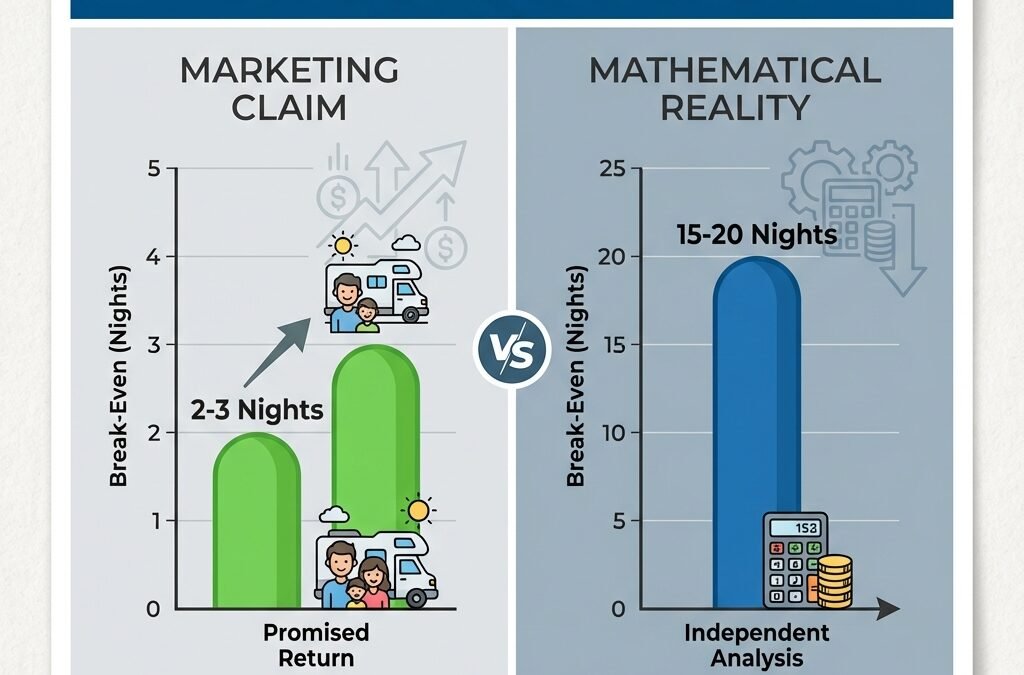
RV membership comparisons often fail because they treat the annual fee as the only cost and assume every planned stay will qualify. That approach produces attractive break-even claims, but it does not reflect how most RVers travel.

A useful calculation must account for the type of membership, the dates and locations you can actually use, expected host purchases, add-on fees, route changes, and the price of the alternative you would otherwise book. This guide replaces unsupported industry-wide statistics and anonymous survey claims with current official pricing and transparent scenario math.
RVer comparing RV membership costs and potential savings
Membership value depends on eligible usage and the cost you actually avoid.

2026 RV Membership Prices at a Glance

RV membership prices in 2026 run from $20 a year for AARP to $775 a year for a one-region Thousand Trails Camping Pass. Most overnight and campground discount memberships list at $39 to $179 a year. This table shows each plan with the price on the vendor’s own site on October 4, 2026. Promotions change without notice, so confirm the final price at checkout.

RV membership prices, checked October 4, 2026 on each vendor’s own page
Program and plan List price Price shown October 4, 2026 Renewal, refund and fine print Vendor source
Campground discount programs and loyalty cards
Good Sam Basic Free Free Earns 1% back in points. No campground discount listed goodsam.com/club
Good Sam Standard $39 a year $39 a year Lists 10% off at Good Sam Campgrounds, 10 cents off per gallon at Pilot Flying J and 5% back in points at Camping World. Renews automatically. Good Sam says membership fees are non-refundable goodsam.com/club
Good Sam Elite $149 a year $149 a year Adds Overnight Stays and 50% off Good Sam RV rental fees. Same renewal and refund terms goodsam.com/club
KOA Rewards $39 a year $39 a year 10% off the daily registration rate. Excludes special offers and weekly, monthly or seasonal rates koa.com/rewards
Passport America Not confirmed on Oct. 4, 2026. Check passportamerica.com Check at checkout 50% off the nightly rate at participating campgrounds, space permitting. Each park sets its own dates and limits passportamerica.com/join
Escapees RV Club $49.95 a year $49.95 a year Also included in Harvest Hosts All Access, which lists it as a $49.95 value escapees.com/benefits
AARP $20 a year $15 for the first year with auto-renew 3 years $55, 5 years $79, lifetime $250. AARP’s travel benefits list no campground discount aarp.org/membership and travel benefits
Host networks (overnight stays)
Harvest Hosts Classic $99 a year $84.15 a year (about 15% off, no end date shown) Refund if unused (no more than 1 completed stay) within 90 days harvesthosts.com/plans and refund policy
Harvest Hosts + Boondockers Welcome $169 a year $143.65 a year (about 15% off) Same refund terms harvesthosts.com/plans
Harvest Hosts All Access $179 a year $152.15 a year (about 15% off) Adds Golf Hosts and an Escapees RV Club membership. Same refund terms harvesthosts.com/plans
Boondockers Welcome only $79 a year $79 a year Boondockers Welcome lists a 100% money-back guarantee boondockerswelcome.com/plans
RV Overnights $49.99 a year $39.99 for the first year, then $49.99 Home page lists a 90-day money-back guarantee. RV Overnights says the $49.99 renewal rate is locked while membership stays continuous rvovernights.com and home page
RV Overnights through the FRVA offer $29.99 first year $29.99 first year Signup page lists $49.99 after year one; confirm renewal. Requires an active Family RV Association membership. FRVA dues are separate rvovernights.com/pages/frva
Campground access pass
Thousand Trails Camping Pass, one region $775 a year $525 promotion through October 5, 2026 Extra regions $140 each. Monthly option: 12 payments of $64.58 with a 2-year agreement. Refund if you cancel within 30 days, or after no more than 2 consecutive nights, whichever comes first thousandtrails.com/camping-pass
Thousand Trails Trails Collection $475 a year $475 a year Add-on to a Camping Pass. Dues are subject to increase. Stays at fee resorts add $20 a night thousandtrails.com/trails-collection
Federal pass
America the Beautiful Senior Pass $80 lifetime or $20 annual $80 and $20, plus $12.50 on USGS Store orders Age 62 and older, US citizens and permanent residents. May take 50% off some federal camping fees. Buying in person avoids the USGS fees nps.gov passes, USGS lifetime and USGS annual

Disclosure: Boondock or Bust is an RV Overnights affiliate. If you join through a link on this page, we may earn a commission at no extra cost to you.

Do not compare temporary sale prices as though they are permanent. On October 4, 2026, RV Overnights showed a $39.99 first-year price that renews at $49.99, Harvest Hosts showed about 15% off its list prices on the plans page, and Thousand Trails showed a $525 promotion that runs through October 5, 2026. The break-even examples below use the more stable published list price unless a promotion is clearly dated.

RV Overnights and FRVA: The Correct Cost Comparison

RV Overnights has two prices that must be shown separately:

  • Public RV Overnights price: $49.99 per year.
  • Eligible Family RV Association member offer: $29.99 for the first year, advertised as 40% off. The signup page lists $49.99 after year one.

Family RV Association membership is not included in the $29.99 first-year RV Overnights fee. FRVA currently charges $99 for one year. An RVer who joins FRVA and then buys RV Overnights would therefore pay $128.99 in the first year before any optional add-ons or transaction-related fees.

Buyer Relevant First-Year Cost Economic Takeaway
Not an FRVA member $49.99 for RV Overnights Use the public RV Overnights price unless another verified discount applies.
Already an eligible FRVA member $29.99 incremental first-year RV Overnights cost The discount saves $20 in year one compared with the $49.99 regular price. Confirm the renewal charge before joining.
Considering FRVA only to get the RV Overnights discount $99 FRVA + $29.99 RV Overnights = $128.99 In year one, this costs $79 more than buying RV Overnights directly at $49.99. Do not join FRVA solely for this discount.
Considering FRVA for several benefits Evaluate the $99 FRVA fee separately, then use $29.99 as the incremental first-year RV Overnights cost The offer can make sense when FRVA’s other benefits already justify its dues.

FRVA Offer and Renewal Warning

RV Overnights advertises a $29.99 first year for eligible Family RV Association members. Its signup page lists $49.99 after year one, while its renewal help page says the discounted signup rate stays in place while the RV Overnights membership remains active. Confirm your recurring charge before joining.

The offer page’s signup button carries promo code FRVA26. Promotional codes can be retired without notice. Confirm the first-year charge and the renewal amount at checkout, and save the checkout page or confirmation email for your records. The FRVA offer page, signup page and renewal help page were rechecked on November 22, 2026.

For a broader feature comparison, see our RV Overnights vs. Harvest Hosts decision guide and our RV Overnights review and complaints analysis.

How to Calculate RV Membership Break-Even

Different membership types require different formulas. A single formula cannot accurately compare a campground discount club, a host network, and a campground access pass.

Formula 1: Discount Memberships

Break-even eligible nights = Annual membership fee ÷ Discount dollars per eligible night

Round the result up to the next whole night. Count only nights when the selected campground, date, rate, and site qualify.

Example: A $39 Good Sam Standard membership used at a qualifying $60 campground produces a $6 discount at 10%. The calculation is $39 ÷ $6 = 6.5, so the membership breaks even on the seventh eligible night.

Formula 2: Host-Network Memberships

Net savings per stay = Comparable overnight cost − Planned host support − Added travel or amenity cost

Break-even stays = Annual membership fee ÷ Net savings per stay

If net savings per stay is zero or negative, the membership does not break even on cost for that itinerary. You may still value the experience, location, or convenience, but that is a travel preference rather than a financial saving.

Formula 3: Campground Access Passes

Break-even nights = Total annual pass cost ÷ Comparable campground cost avoided per eligible night

Total annual pass cost should include required regions, collections, taxes, fees, paid utilities, and added route costs.

Availability matters. A pass may appear to break even in ten nights, but it provides no savings if the campgrounds you need are unavailable or outside your purchased region.

Worked Break-Even Examples

These are transparent scenarios, not national averages. Replace each assumption with your own planned rates and costs.

RV Overnights Public Price vs. Eligible FRVA First Year

Assume each host stay replaces a paid campground and produces the net savings shown after subtracting the purchase you plan to make and any added travel cost.

Net Savings per Host Stay Public Price: $49.99 Eligible FRVA First Year: $29.99
$15 4 stays 2 stays
$20 3 stays 2 stays
$25 2 stays 2 stays
$30 2 stays 1 stay
$40 2 stays 1 stay

Example: If a host stay replaces a $50 campground, you plan to spend $20 supporting the host, and the route adds no extra cost, your net savings is $30. The public membership breaks even in two stays. An existing eligible FRVA member breaks even in one stay at the advertised $29.99 first-year rate. Rerun the math at renewal with the charge RV Overnights confirms.

Harvest Hosts Classic: regular cost vs. 20% first-year discount

BOONDOCK30: 30% off for new Harvest Hosts members through Jan. 12

Holiday sale through Jan. 12: code BOONDOCK30 takes 30% off the first year of any Harvest Hosts plan. Compare Harvest Hosts plans, pick a plan, and enter the code at checkout. Please enter the code even though the sale price already shows on the Harvest Hosts site. It helps Harvest Hosts credit Boondock or Bust for your signup.

Save 20% on Harvest Hosts

Affiliate disclosure: Boondock or Bust may earn a commission at no extra cost to you. Confirm the final price and renewal terms at checkout.

Harvest Hosts states that there are no camping fees at host locations and asks members to support the host through a purchase or donation. Because there is no universal required purchase amount, use your own planned host-support budget.

Net Savings per Stay Break-Even at $99 List Price First-Year Break-Even at $79.20 with BOONDOCK20
$15 7 stays 6 stays
$20 5 stays 4 stays
$25 4 stays 4 stays
$30 4 stays 3 stays
$40 3 stays 2 stays

Harvest Hosts may still be worthwhile when the host experience is part of the trip. Do not label the host purchase as wasted money if you would have bought the product, meal, tasting, or attraction anyway. Do subtract it when the purchase is an added expense created by the stay.

Good Sam Standard

Good Sam Standard costs $39 per year and advertises 10% off the nightly rate at Good Sam Campgrounds. Break-even changes with the qualifying nightly rate.

Qualifying Nightly Rate 10% Savings Break-Even Nights
$40 $4 10 nights
$50 $5 8 nights
$60 $6 7 nights
$80 $8 5 nights

Good Sam also includes other benefits, including fuel and retail offers. Count those only when you would use them without changing your spending solely to justify the membership.

Passport America

Passport America costs $49 per year and advertises 50% off the regular nightly rate at participating campgrounds. The discount is subject to space availability and the Important Campground Notes for each park. Those notes can set eligible days, seasons, stay lengths, reservation rules, and extra charges.

Regular Nightly Rate 50% Savings Break-Even Eligible Nights
$40 $20 3 nights
$50 $25 2 nights
$60 $30 2 nights
$80 $40 2 nights

The table is valid only when your selected campground and dates qualify. A nominal two-night break-even is irrelevant if the discount is unavailable on the dates you can travel.
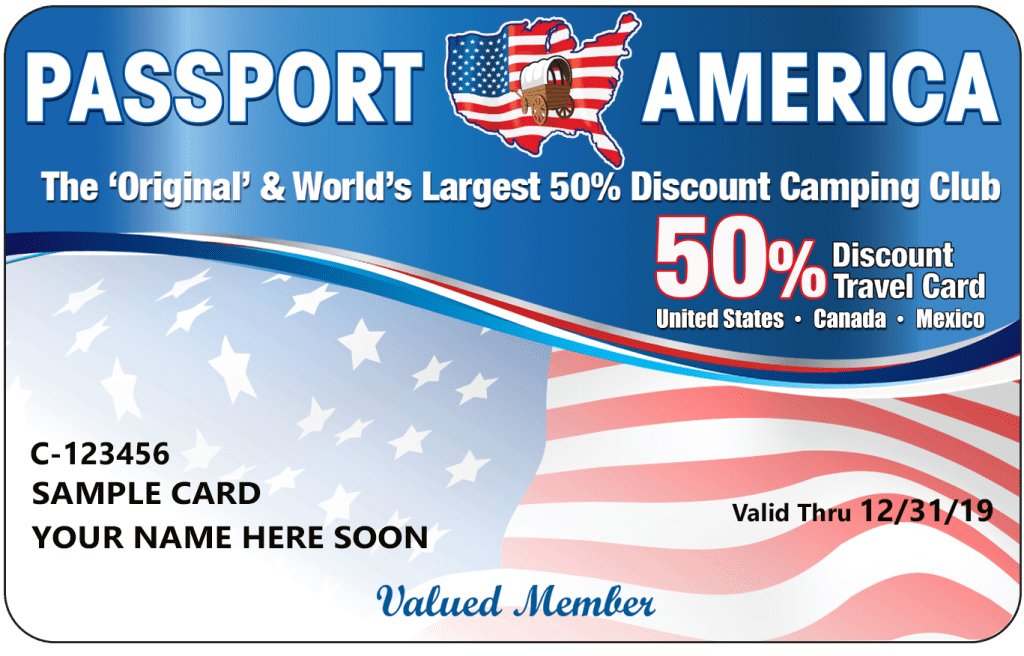
Passport America membership card used for campground discounts
Check each Passport America campground’s Important Campground Notes before counting a discounted night.

Thousand Trails Camping Pass

Thousand Trails lists regular annual dues of $775 for a one-region Camping Pass, with additional regions at $140 and the Trails Collection at $475. A $525 single-region promotion runs through October 5, 2026. Thousand Trails also offers a monthly option of 12 payments of $64.58 with a two-year agreement. Promotions change frequently, reservations are required, and availability is not guaranteed. Verify the final first-year and renewal prices at checkout. Pricing rechecked October 4, 2026.

Using a $55 comparable campground as a scenario:

  • Regular $775 base pass: $775 ÷ $55 = 14.09, so 15 eligible nights.
  • Regular base pass plus $475 Trails Collection: $1,250 ÷ $55 = 22.73, so 23 eligible nights.
  • Regular base pass plus one added region: $915 ÷ $55 = 16.64, so 17 eligible nights.

These calculations exclude taxes, fees, paid utilities, and travel changes. As of October 4, 2026, the Camping Pass FAQ set a maximum stay of 14 consecutive days and required a seven-night wait after a stay longer than four consecutive nights. The Trails Collection has its own stay rules. Verify current stay and reentry rules before booking.

See our Thousand Trails membership guide before buying a pass based only on a headline price.

Costs Basic Membership Tables Miss

These costs are not necessarily deceptive or universal. They are variables that must be included when they apply to your trip.

Host Support

RV Overnights and Harvest Hosts are built around supporting host businesses. The platforms do not publish one mandatory purchase amount for every stay. Use the amount you realistically expect to spend.

Paid Amenities

Some hosts or campgrounds may charge for hookups, extra people, pets, premium sites, electricity, or other services. A membership discount may apply only to the base nightly rate.

Processing and Handling Fees

Some passes add mandatory fees at checkout that do not appear in the headline price. The federal recreation passes below are the clearest example: the Senior Annual Pass is listed at $20 but costs $32.50 delivered from the USGS Store once processing and handling are added. Always price the pass or membership at final checkout, not at the advertised figure.

Added Mileage

A membership location that requires a detour can erase the savings. Calculate added fuel as:

Added fuel cost = Extra miles ÷ Your real towing or motorhome MPG × Current fuel price

Use your own recent fuel receipts and actual RV fuel economy. Do not rely on a generic national average when the vehicle and route determine the cost.

Availability and Restrictions

Count only nights you can realistically book. For Passport America, read the participating park’s notes. For Thousand Trails, review region access, booking windows, stay rules, and current availability. For host networks, check rig limits, arrival windows, generator rules, pets, road access, and same-day booking options.

Auto-Renewal and Price Changes

Several programs renew automatically. Record the renewal date, current renewal price, cancellation process, and any price-lock terms. Recheck the official offer before renewal because promotional pages and subscription language can change.

RVer reviewing membership restrictions and trip costs on a laptop
A route-level review is more useful than a generic membership ranking.

Which RV Membership Fits Which Travel Pattern?

Travel Pattern Programs Worth Testing Main Risk Decision Test
Short travel days with interest in local businesses RV Overnights or Harvest Hosts Classic Host spending or detours erase the avoided campground cost Map at least three realistic host stays before joining.
Flexible off-peak campground travel Passport America Chosen dates or stay length do not qualify Verify two or three eligible campgrounds on your planned route.
Frequent stays at participating private campgrounds Good Sam Standard or Escapees Discount per night is too small to recover the annual fee Calculate using the actual qualifying rate, not a resort rack rate.
Repeated regional travel near Thousand Trails properties Thousand Trails Camping Pass Geographic mismatch or unavailable dates Build a sample itinerary inside one region before buying add-ons.
Private-property stays with potential multi-night options Boondockers Welcome Host availability, hookup fees, or route mismatch Confirm hosts near actual destinations, not just nationwide totals.
RVers who want community, education, events, and several benefits FRVA or Escapees Treating a broad association membership as a camping-only discount Assign value only to benefits you expect to use.

Compare Prices by Question

This page is the price reference. Use the guides below for the question you are trying to answer.

Membership Alternatives and Complements

A membership is one tool. It does not need to cover every night.

  • Public-land dispersed camping: The Bureau of Land Management states that most BLM lands allow dispersed camping unless posted otherwise. The general limit is 14 days within a 28-day period, but state and field-office rules can differ. Verify the local rule before arrival.
  • Federal Recreation Passes: As of October 4, 2026, the USGS Store listed the America the Beautiful Resident Annual Pass at $80 plus a $7.50 handling fee, the Senior Annual Pass at $20 plus a $5 processing fee and a $7.50 handling fee, and the Senior Lifetime Pass at $80 plus a $5 processing fee and a $7.50 handling fee. Both Senior passes are available to U.S. citizens and permanent residents age 62 or older. Those added fees matter: the Senior Annual Pass costs $32.50 delivered, not $20. Buying in person at a federal recreation site or digitally through Recreation.gov uses a different fee structure. A separate Non-Resident Annual Pass costs $250 plus $7.50 handling, which is why the standard pass is now labeled Resident. These passes primarily cover entrance and standard amenity fees, not a universal campground discount. Verify current pass prices, fees, and eligibility rules before purchasing.
  • Direct campground booking: A campground’s weekly, monthly, shoulder-season, or direct-booking rate may beat a membership discount.
  • State and local programs: State park passes and resident discounts can provide better value when most travel occurs in one state.

Review our real-world boondocking cost guide and BLM camping rules guide before treating dispersed camping as universally free or unrestricted.

RV traveling toward a flexible mix of campgrounds and boondocking locations
A mixed strategy often provides more flexibility than forcing every trip through one membership.

A Five-Step Membership Decision Process

  1. Map the next 12 months. List the routes, dates, and regions you are likely to use.
  2. Identify eligible stays. Check the current directory, campground notes, region map, rig limits, and booking rules.
  3. Calculate the alternative cost. Use the campground or overnight option you would realistically book without the membership.
  4. Subtract added costs. Include host support, hookups, fuel, processing and handling fees, and required add-ons.
  5. Add a margin of safety. Buy only when expected savings exceed the fee by enough to absorb one cancelled or unavailable stay.
Practical rule: Do not buy because a program claims it can pay for itself. Buy when you can identify enough specific, eligible uses to show that it is likely to pay for itself on your routes.

Frequently Asked Questions

What is the cheapest RV membership in this comparison?

Good Sam Standard is $39 per year among the broadly available paid memberships listed here. Eligible Family RV Association members can receive the RV Overnights offer advertised at $29.99 for the first year, but FRVA membership has its own $99 annual cost.

Does FRVA membership include RV Overnights at no additional charge?

No. FRVA provides access to a discounted RV Overnights offer. Eligible members still pay the separate RV Overnights fee.

Should I join FRVA only to get the RV Overnights discount?

No. A one-year FRVA membership plus the advertised $29.99 first year of RV Overnights totals $128.99. In year one, that is $79 more than buying RV Overnights directly at the $49.99 public price. The FRVA route makes financial sense only when you already value FRVA’s other benefits.

How many RV Overnights stays are needed to break even?

It depends on the net savings per stay. At $30 in net savings, the $49.99 public membership breaks even in two stays. The advertised $29.99 FRVA first year breaks even in one stay for an already eligible FRVA member.

Are Harvest Hosts stays free?

Harvest Hosts states that there are no camping fees at host locations. It asks members to support the host with a purchase or donation. Include the amount you expect to spend when calculating net savings.

Does Passport America always provide 50% off?

The membership provides 50% off the regular nightly rate at participating campgrounds on a space-available basis. Each campground sets its own rules, qualifying dates, stay limits, reservation requirements, and possible extra charges in its Important Campground Notes.

How much does the Senior Pass actually cost?

The Senior Annual Pass is listed at $20 and the Senior Lifetime Pass at $80, but USGS Store orders add a $5 processing fee and a $7.50 handling fee to each. That makes the real delivered cost $32.50 and $92.50 as of October 4, 2026. Both passes require U.S. citizenship or permanent residency and age 62 or older.

Does the America the Beautiful Pass pay for RV camping?

Not generally. The annual pass primarily covers entrance and standard amenity fees at participating federal recreation sites. Some qualifying passholders may receive discounts on certain expanded amenity fees, but campground treatment varies by location and operator.

Verification Notes and Official Sources

This revision removes unsupported survey percentages, market-size claims, named expert quotations, regional density estimates, cancellation statistics, fuel forecasts, and member-behavior claims that could not be verified through credible primary sources.

Methodology: The price table (except Passport America pricing, which we could not confirm on its site), the Good Sam and Thousand Trails examples and the federal pass fees were checked against each vendor’s own website on October 4, 2026. The RV Overnights FRVA offer, FRVA signup page and renewal help page were rechecked on November 22, 2026. FRVA dues, the BOONDOCK20 offer and the host-support policy keep their earlier check dates where they appear. Break-even figures are arithmetic scenarios based on stated assumptions. They are not predictions, survey findings, or claims about the average RVer.

Update policy: Verify the current checkout price, renewal amount, eligibility requirements, and restrictions before purchasing. Promotional codes and terms can change.

Affiliate disclosure: Some links may generate a commission. That does not change the formulas, source requirements, or recommendation to verify current terms directly with the provider.

Last updated: October 4, 2026
Pricing verification date: October 4, 2026 for the price table. FRVA dues and the BOONDOCK20 offer were last checked on earlier dates.
Recommended next review: January 2027 or sooner if a major program changes pricing or terms
Free Truck GPS Apps for RVers (2027): Smart Backup Tool or Risky Shortcut?

Free Truck GPS Apps for RVers (2027): Smart Backup Tool or Risky Shortcut?


Quick Answer

Free truck GPS apps like TruckMap can help RVers check routes for low bridges, weight limits, and restricted roads. TruckRouter.com adds free desktop pre-trip planning with height, weight, and clearance restriction data. Both are useful as secondary safety checks, not as dedicated RV GPS replacements. Truck-routing tools are built for commercial trucks. Their listings focus on trucking, not campground access. Use them alongside Google Maps and campground arrival instructions, not instead of either.

How these apps were compared: I reviewed each app’s published features, vehicle settings and pricing as of November 25, 2026. I have not yet route-tested them on the road. Always check clearances and restrictions against posted signs.

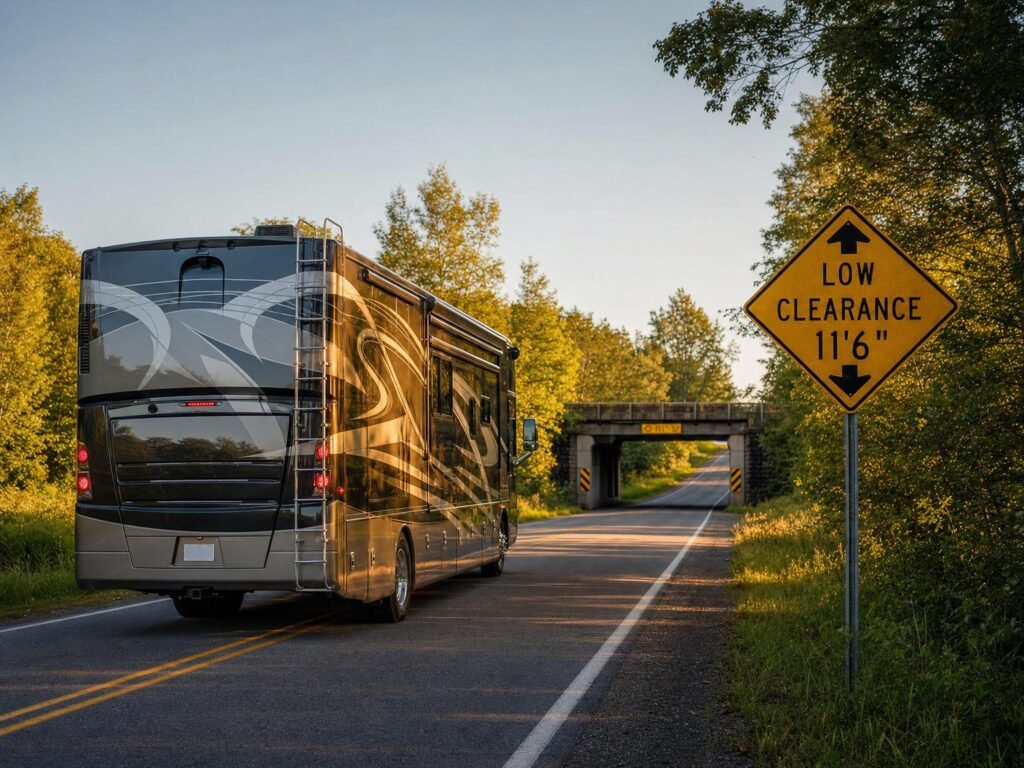
If you drive a Class A motorhome, a tall fifth wheel, or anything over 10 feet tall, Google Maps has a blind spot that matters. Its vehicle profile asks for engine type only (Google Maps Help). It does not take your vehicle height, length or weight. It cannot warn you about a low bridge until you are staring at it through your windshield.

That is not speculation. The U.S. government’s own GPS.gov website confirms it: consumer GPS apps generally do not warn drivers of restricted roads, low bridges, or other information relevant to commercial motor vehicles (GPS.gov, Truck Traffic Routing). The same page says many truck drivers are unaware of this, which leads to bridge strikes and other problems. The FMCSA says it will distribute its “GPS Selection Guide for CMVs” visor card and encourage driver training schools to cover how to choose an electronic navigation system (FMCSA, Bridge Strike FAQ).

So what can RVers do about it without paying for another subscription? Free truck-routing apps exist. Some of them are genuinely useful as backup planning tools. But most “free RV GPS” advice online is either outdated, subscription-gated, or not actually RV-specific. This guide explains where free truck GPS tools fit, where they fall short, and how to build a safer routing stack without pretending any single app is magic.

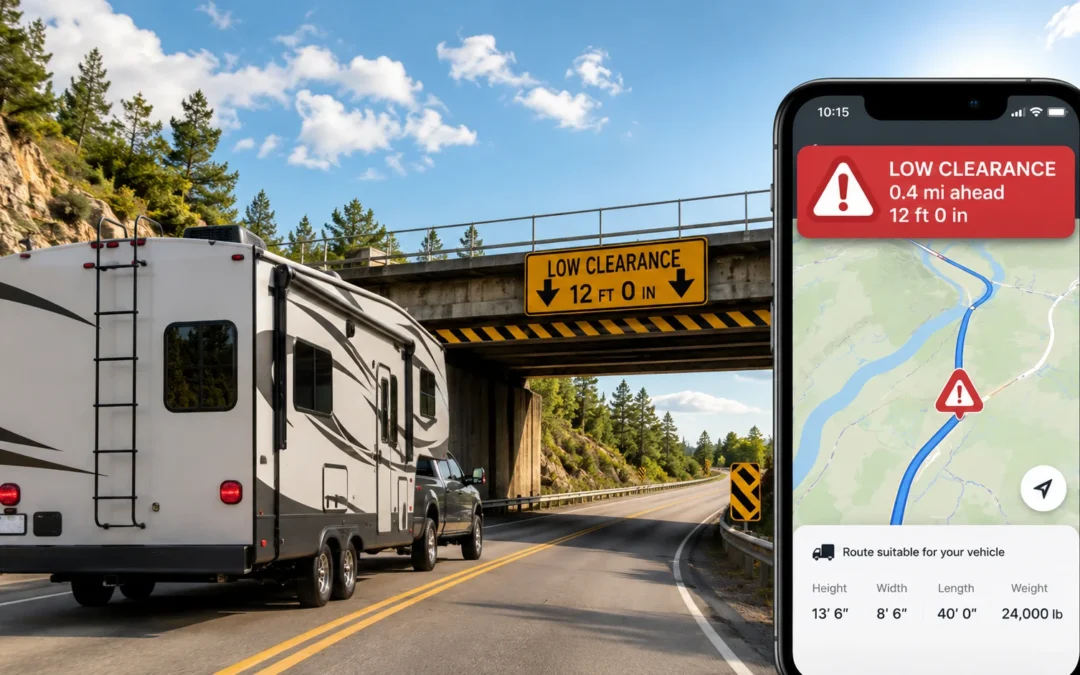
Class A Motorhome Approaching Low Clerance Bridge

Consumer GPS apps do not warn RVers about low bridges or restricted roads. Free truck GPS tools can fill part of that gap.

Why Google Maps Is Not Enough for Bigger RVs

Google Maps is excellent for drive time, traffic conditions, and finding gas stations. It is not designed for vehicles taller than a standard passenger car. Google Maps does not accept vehicle height, length, weight, or axle count as routing inputs. It cannot filter routes by bridge clearance, weight restriction, or propane prohibition.

Google’s November 16, 2026 Ask Maps update did not change this. It added trip itineraries and “Know before you go” route tips covering parking, car charging, weather, delays and tolls, but no vehicle dimensions (Google, 2026). The app still routes your RV like a car. See what the new Google Maps features do for boondockers.

For a passenger car, this is fine. For a 13-foot-tall fifth wheel or a 45-foot Class A motorhome, it creates real hazards:

  • Low bridge clearances that Google does not flag until you are committed to the road
  • Weight-restricted roads that may not support a loaded RV and tow vehicle
  • Parkways and scenic routes that prohibit commercial vehicles and large RVs
  • Narrow mountain switchbacks where turning radius matters
  • Tunnel restrictions that prohibit vehicles carrying propane

The same limitation applies to Waze and Apple Maps. All three are consumer GPS tools designed for cars.

⚠️ Common Misconception

Myth: “Low bridge strikes only happen to semi trucks. RVers don’t need to worry about clearance routing.”

Why it persists: Most bridge strike reporting focuses on commercial trucking incidents, making it easy to assume the problem does not apply to recreational vehicles.

Reality: Bridge strikes are a recognized hazard for tall vehicles. The Federal Motor Carrier Safety Administration says it encourages training on choosing an electronic navigation system and distributes a GPS selection guide for commercial vehicles (FMCSA bridge strike FAQ). A clearance sign applies to a tall motorhome or fifth wheel the same way it applies to a truck. If your rig is taller than the posted clearance, you cannot pass.

What to do: Measure your RV height from ground to tallest point (including roof air conditioners, antennas, and cargo) and enter that dimension into any truck GPS app before routing. Never assume Google Maps or Waze will warn you about a clearance issue. They will not.

Can RVers Use Truck GPS Apps?

Yes, with limits. Free truck GPS apps can help RVers check routes for low clearances, weight restrictions, hazmat-restricted roads, and truck-forbidden segments. TruckMap lets you set truck height and weight. TruckRouter.com lists weight, height, width and length restrictions.

But truck routing and RV routing are not identical. The core difference: truck GPS apps are designed for commercial 18-wheelers running interstate freight corridors. They optimize for truck stops, weigh stations, diesel fuel, and Hours of Service compliance. RVers need campground access roads, propane-friendly tunnels, scenic routes suitable for large vehicles, and dump station locations.

A truck GPS app should flag a road with a 12-foot bridge clearance if the restriction is in its database. It will not tell you that the campground entrance has a hairpin turn your 42-foot rig cannot make.

The practical use case: treat a free truck GPS app as a secondary route safety check before you drive, not as your only navigation source.

Tool Cost Best For RV Limitation
TruckMap Free Live turn-by-turn truck routing with custom vehicle profiles Built for commercial truckers, not RVers
TruckRouter.com Free (web only) Pre-trip desktop planning with height, weight, and width restrictions No mobile app; desktop planning only
Google Maps Free Drive time, traffic, fuel, and general navigation No vehicle dimension input; cannot warn about low bridges or weight limits

Best Free Option: TruckMap

TruckMap is a free truck-routing app available on iOS and Android as of November 2026. It provides truck-optimized GPS routes with turn-by-turn navigation designed for commercial vehicles. Its App Store listing covers truck weight, low clearance and HAZMAT restrictions, custom truck height and weight, and routing around truck-forbidden roads.

For RVers, the useful features include:

  • Custom vehicle profiles where you set truck height and weight. The store listings do not mention a length setting
  • Low bridge avoidance based on clearance data
  • Weight restriction routing that bypasses roads your vehicle cannot legally use
  • Truck-restricted road avoidance that keeps you off parkways and residential streets not designed for large vehicles
  • Hazmat routing that avoids tunnels and roads prohibiting hazardous materials (relevant if you carry propane, although commercial hazmat rules may be stricter than those for RVs with fixed propane tanks — verify propane restrictions with posted signage or local DOT rules)

Both store listings show TruckMap as free when checked November 25, 2026. The listings also promote a freight marketplace for carriers, which RVers can ignore.

TruckMap app interface

TruckMap lets you enter custom vehicle dimensions for truck-safe routing. Free on iOS and Android.

What TruckMap is built for: The App Store listing describes an app for truck drivers. It lists truck stops, weigh stations, overnight parking, diesel fuel and a freight marketplace. Its location filters include RV dump stations and propane. The listing does not mention campground access instructions, so plan your arrival separately.

RV use case: Run your planned route through TruckMap before you leave. If TruckMap flags a clearance or restriction issue that Google Maps missed, reroute. If both apps agree, keep checking posted signs. Agreement between two apps does not prove the road is safe for your rig.

Platforms: iOS (App Store) and Android (Google Play).

Best Free Pre-Trip Tool: TruckRouter.com

TruckRouter.com is a free web-based truck routing tool as of November 2026. It is better for desktop trip planning than live in-cab navigation. Registration is free.

TruckRouter’s feature list includes truck-specific routes and data on:

  • Weight, height, width, and length restrictions along the planned route
  • Low clearances along the planned route
  • Truck warnings along the route
  • Toll costs and toll road identification
  • Truck stop locations along the route
  • Route elevation data for the planned route
  • State mileage reports with Excel export

RV use case: Before a travel day, enter your route into TruckRouter from a laptop. Review the restriction flags and elevation data. If the route shows a low clearance bridge or a steep grade you did not expect, adjust before you are behind the wheel. Print or screenshot the route summary as a backup reference.

Limitation: TruckRouter.com is a web tool, and its site lists no mobile app. Treat it as a desktop planning tool. You cannot use it for live turn-by-turn navigation on the road.

The core question this guide answers: Can RVers use free truck GPS apps to avoid low bridges and restricted roads? Yes, as a secondary safety check. TruckMap provides live turn-by-turn truck routing with custom vehicle profiles. TruckRouter.com provides desktop-based pre-trip planning with restriction data. Neither replaces campground arrival instructions, posted road signs, or an RV-specific GPS for drivers who want a single integrated solution.

Where Free Truck GPS Falls Short for RVers

Free truck GPS tools solve part of the safe-routing problem. They do not solve all of it. The gap between “truck safe” and “RV safe” is real, and pretending otherwise puts your rig at risk.

Free truck routing tools typically do not account for:

  • Campground entrance roads with tight turns, low tree branches, or unpaved surfaces
  • RV park access instructions that specify a particular entrance or approach direction
  • Propane rules by tunnel or bridge that apply to recreational vehicles but not to all commercial trucks
  • Scenic road suitability for large or heavy RVs
  • Tight campground turns that a semi truck would never attempt but an RVer might
  • Gravel and dirt road comfort for vehicles with low ground clearance or long wheelbases
  • Dump station and potable water locations that are RV-specific points of interest
  • Class B vs. Class A vs. fifth wheel differences in maneuverability and clearance needs

A truck GPS routes an 18-wheeler between loading docks. An RV GPS should route your rig between campsites. The data requirements are different, and free truck tools were not built with campground data in their systems.

This matters most on BLM and National Forest dispersed camping roads where access conditions change seasonally and posted signs may be the only reliable information available.

A Safer Routing Stack

Here is a suggested routing workflow for free or low-cost trip planning. It is built from each tool’s published features, not from road tests:

Pre-Trip (Desktop or Laptop)

  1. Google Maps for general drive time, traffic patterns, and fuel stop identification.
  2. TruckRouter.com for a truck-route safety check on the same route. Review height, weight, and clearance flags. Compare against the Google Maps route.
  3. Campground arrival instructions. Read the campground or dispersed site’s specific approach directions. Many BLM sites and RV parks specify which road to use and which to avoid.

On the Road (Mobile)

  1. Google Maps for live navigation, traffic rerouting, and finding services.
  2. TruckMap as a live secondary check if you encounter an unfamiliar road or detour.
  3. State DOT signage and local posted signs. If an app says the road is fine but a posted sign says otherwise, trust the sign. Posted restrictions are legally enforceable. App data is advisory.

The non-negotiable rule: Never ignore a posted sign because an app says the road is fine. Posted bridge clearance signs, weight limit signs, and no-truck signs are placed there by the authority that owns the road. An app’s database may be outdated. The sign is current.

If you plan to boondock on public land, download offline maps while you still have Wi-Fi. Cell data limits make on-the-road downloads impractical, and dispersed camping areas are frequently in dead zones. Our RV internet setup guide covers dual-path connectivity for staying online in remote locations.

When a Paid RV GPS Tool Still Makes Sense

Free truck GPS apps fill a gap. They do not eliminate the need for a dedicated RV navigation solution for everyone. A paid RV GPS tool still makes sense for:

  • Big Class A motorhomes (35+ feet) where every turn and clearance matters
  • Tall fifth wheels with rooftop air conditioners pushing total height above 13 feet
  • Frequent mountain driving where grade warnings and descent alerts reduce brake fade risk
  • Long-distance trip planning across multiple states with varying restriction databases
  • RVers who want one integrated system combining safe routing, campground data, and dump station locations in a single interface
  • Anyone nervous about low bridges or restricted roads who wants maximum coverage rather than a patchwork of free tools

Paid RV GPS tools add RV-focused data. The RV LIFE App Store listing describes RV Safe GPS and an RV park database. The CoPilot GPS App Store listing offers RV routing based on vehicle size and campground search, though not in all regions. Garmin lists an RV Parks & Services directory for its RV 1095 navigator. The tradeoff is cost. The benefit is coverage. For high-risk rigs, the cost of a paid GPS subscription is small compared to the potential cost of a single bridge strike or wrong turn.

Bottom Line

Free truck GPS apps can help RVers avoid low bridges, weight-restricted roads, and truck-prohibited segments. Whatever app you use, check that it lets you enter your RV’s height, weight and length. TruckMap provides live truck-safe routing with custom vehicle profiles at no cost. TruckRouter.com adds free desktop pre-trip restriction checks with height, weight, and clearance data.

They are not a perfect replacement for an RV-specific GPS or dedicated trip planner. They are built for commercial trucks, and their listings do not cover campground access roads. Use them as a safety check layer in your routing workflow, not as a guarantee.

The safest approach combines free tools with common sense: check the route before you drive, verify with campground arrival instructions, and never override a posted sign because an app told you the road was clear.


Chuck Price

Chuck Price is the founder of Boondock or Bust and has 35+ years of RV camping experience and travels in a 2018 Hymer Aktiv Class B. Chuck was featured on CBC Radio’s Cost of Living in 2024, in a segment on the cost of full-time RV living. Learn more about Chuck.

Last updated: November 27, 2026. App listings, features and prices were last checked November 25, 2026. Confirm current pricing directly with each app before downloading or purchasing.

Yosemite RV Trip Planning for 2026: No Reservations, Busy Lots, and What to Do About It

Yosemite RV Trip Planning for 2026: No Reservations, Busy Lots, and What to Do About It

Your current planning guide for Yosemite in 2026, updated with real-world conditions from the first weeks of the season: parking alerts, digital passes, towing enforcement, RV strategy, and transit backups.

Looking for an annual pass? See the America the Beautiful pass guide and the 2026 nonresident fee guide.

By Chuck Price. Last updated: November 13, 2026

Quick Reference

  • 2026 Entry Rule: No entrance reservation is required at any time of day.
  • Parking Reality: In spring 2026, Valley lots filled by 7:30 AM on peak weekends and holidays. NPS added shuttles and Valley parking in late June and reported only two days of significant traffic delays all season, both on Memorial Day weekend. NPS still advises arriving before 8 AM. Illegal parking leads to citations and towing.
  • New: Digital Passes: Buy your entrance pass online at Recreation.gov up to two days before your visit. Download it to your phone. Skip the gate line.
  • New: Text Alerts: Text YNPTRAFFIC to 333111 for real-time parking and traffic alerts. Text YOSEMITE to 333111 for general park alerts.
  • You Still Need: The entrance fee ($35 per private vehicle, valid for 7 consecutive days, plus $100 per person age 16 and older for nonresidents at 11 designated parks including Yosemite), plus any campground, lodging, Half Dome, or wilderness permits tied to your trip. See the fee table or verify current fees at NPS.
  • Best Backup Plan: Use YARTS from a gateway community to bypass the parking problem entirely.
  • Best Pre-Trip Check: NPS Current Conditions page the night before and the morning of your visit.
  • Golden Rule: Screenshot every reservation, permit, and map before you lose cell service.

May 2026 Update: What We Predicted Is Now Happening

When we published this guide in March 2026, we warned that dropping the entrance reservation would shift the problem from timed access to parking and congestion. That is exactly what has happened. Yosemite recorded its highest spring visitation in a decade, according to NPS visitation data cited by the Fresno Bee. On the first major weekend in May, an Outside writer described tow trucks clearing illegally parked vehicles from the Camp 4 overflow lot while the shuttle bus sat trapped behind them, and a 1.8-mile line of cars parked illegally along the road between Camp 4 and El Cap Picnic Area. Social media filled with reports of 90-minute entry lines, overflowing lots, and trail congestion.

Both Yosemite and Sequoia National Parks posted warnings on social media about citations and towing for vehicles parked on roadsides, meadows, or in unmarked spots. Visitors reported parking lots full before 7:30 AM on peak days.

This guide has been updated with digital pass options, text-based parking alerts, towing and citation details, Tioga Road status, updated entrance fee details, and revised arrival timing based on observed conditions.

Summer and Fall 2026 Update: What NPS Reported

The May crunch did not last all season. In an August 28, 2026 release, NPS reported only two days of significant traffic delays in 2026, both on Memorial Day weekend. The park added shuttle service and Valley parking in late June, plus real-time entrance wait times. NPS described the July 3 to 5 holiday weekend as free-flowing, and 91% of surveyed visitors waited less than 15 minutes at the entrance.

Early arrival still pays on busy days. NPS advises arriving before 8 AM.

Hiker reading Yosemite entrance sign at sunrise with granite cliffs and sky
Yosemite in 2026 has no entrance reservation, but parking, traffic, and towing enforcement are the real planning constraints.

What Changed for 2026

In February 2026, Yosemite Superintendent Ray McPadden announced that the park would not use a timed-entry reservation system in 2026. The NPS cited its evaluation of 2025 traffic patterns. The decision came after an April 2025 order from Interior Secretary Doug Burgum to keep national parks open and accessible.

The park entrance fee still applies. Yosemite now relies on active traffic management instead of timed-entry reservations. That includes real-time traffic monitoring, temporary traffic diversions when parking areas fill, and additional staffing at key intersections during peak periods.

What that means for you: Stop planning around a 6am-to-2pm entry window. That mental model is dead. In 2026, your biggest problems are parking, traffic backups, road conditions, towing enforcement, and limited cell service.

New for 2026: Digital Entrance Passes

Yosemite now offers digital entrance passes through Recreation.gov. You can purchase a single-visit pass up to two days before your trip and download it to your phone or digital wallet (Apple Wallet, Google Wallet). This lets you skip the payment step at the entrance gate and move through faster.

The America the Beautiful annual pass is $80 for US residents and $250 for nonresidents. Both cover entrance and standard amenity fees at lands managed by six federal agencies, including the National Park Service, and digital versions are available through Recreation.gov. Verify current pricing at Recreation.gov before purchasing.

Buy Yosemite Digital Pass
Buy America the Beautiful Pass

New for 2026: Nonresident Entrance Fee

Beginning in 2026, nonresidents (non-US residents) pay an additional $100 per person (age 16 and older) on top of the standard $35 vehicle entrance fee. Children 15 and under do not pay the nonresident fee. The nonresident America the Beautiful annual pass ($250) covers the whole vehicle, or two motorcycles, or the passholder plus three additional adults where fees are charged per person. NPS applies the nonresident fee at 11 parks: Acadia, Bryce Canyon, Everglades, Glacier, Grand Canyon, Grand Teton, Rocky Mountain, Sequoia and Kings Canyon, Yellowstone, Yosemite and Zion. Fee structures can change. Verify current rates at the NPS Yosemite fees page before your trip.

Yosemite Entrance Fees in 2026: What an RV Pays

An RV or other private vehicle pays $35 to enter Yosemite. The pass is valid for seven consecutive days and covers everyone in the vehicle. Nonresidents age 16 and older pay an extra $100 each, unless they enter with an annual or America the Beautiful pass.

What you pay for Fee Who it covers Valid for
Private vehicle (non-commercial car, pickup, RV or van with 15 or fewer passenger seats) $35 The vehicle and everyone inside 7 consecutive days
Motorcycle $30 Up to 2 motorcycles and 4 total passengers 7 days
Per person on foot, bicycle or horse $20 One person age 16 or older. Age 15 and younger enter free 7 consecutive days
Nonresident fee (non-US residents) $100 per person Each nonresident age 16 or older, added to the entrance fee. Does not apply with an annual or America the Beautiful pass Charged on top of the entrance fee
Yosemite Annual Pass $70 US citizens and permanent residents. Free entrance to Yosemite 12 months from purchase
America the Beautiful annual pass, US resident $80 One private vehicle fee or four per-person fees Annual
America the Beautiful annual pass, nonresident $250 The whole vehicle, or two motorcycles, or the passholder plus three additional adults where fees are per person Annual
Senior Pass (age 62 and older, US citizens and residents) $20 annual or $80 lifetime Same coverage as the America the Beautiful pass Annual or lifetime
  • Payment: NPS says Yosemite accepts major credit cards and mobile payment services and does not accept cash. A digital entrance pass bought in advance can shorten your time at the entrance.
  • Example for a US family: Four US residents in one RV pay $35 for seven days. That is the vehicle fee only.
  • Example for nonresidents: Two nonresident adults in one RV pay $35 plus $200, or $235. Three nonresident adults pay $335, which is more than the $250 nonresident annual pass. These totals are calculated from the NPS fees above. Children age 15 and younger do not pay the nonresident fee.
  • Fee-free days: NPS’s 2026 fee-free days ended November 11 (Veterans Day). NPS had not posted 2027 dates when we checked on November 13, 2026. Free entrance days apply to US citizens and residents only. Nonresidents pay the entrance fee and the $100 nonresident fee.

Fees checked against NPS on November 13, 2026. Fees can change, so confirm them on the NPS Yosemite fees page before you go.

What You Actually Need to Plan for in 2026

Without an entrance reservation requirement, Yosemite planning gets simpler on paper but harder in practice. The first weeks of the 2026 season confirmed this. The park recorded its highest spring visitation in a decade, according to NPS data cited by the Fresno Bee. Parking lots filled before mid-morning on weekends. NPS deployed tow trucks and issued citations for illegal parking on meadows and roadsides.

Your working checklist for 2026 should focus on six things:

  • Digital pass: Buy it before you leave home. It saves time at the gate.
  • Text alerts: Sign up for YNPTRAFFIC (text to 333111) before you lose cell service.
  • Road conditions: construction, chain controls, weather delays, and closures.
  • Parking strategy: Arrive before 7:30 AM on weekends/holidays. Have a backup lot in mind. Plan to park once and stay parked.
  • Backup transportation: YARTS from a gateway community, or the free in-park shuttle once parked.
  • Offline readiness: Screenshots of maps, permits, campground confirmations, and your digital pass before you lose service.

The Best 2026 Yosemite Arrival Strategy

Arrival Framework (Updated for 2026 Conditions)

  • If you want parking: Arrive before 8 AM, as NPS advises, and earlier on weekends and holidays. In spring 2026, Valley lots filled by 7:30 AM on peak weekends and by mid-morning on some peak weekdays.
  • If you hate stress: Visit midweek. Avoid arriving between 10 AM and 2 PM on any day during peak season.
  • If you are driving a larger RV: Have a backup parking target before you enter the Valley. Your options disappear faster than they do for cars.
  • If you are flexible: Use YARTS from Mariposa, Oakhurst, Groveland, or another gateway community. You bypass the parking problem entirely.
  • If you are depending on chargers, specific trailhead parking, or oversized spaces: Plan conservatively and assume your first choice will be full.
  • Park once and stay parked: This is now official NPS guidance. Walk, bike, or shuttle from your parking spot for the rest of the day. Do not give up a spot to repark closer to your next destination.

Earlier Yosemite reservation years trained visitors to think in terms of entry windows. In 2026, replace that with a parking-first model. Your goal is not beating a reservation clock. Your goal is getting in before your preferred lot, shuttle stop, or activity becomes unavailable.

The 2026 season has proven this is not theoretical. On a Thursday before Memorial Day weekend, even visitors who found parking described themselves as lucky. On the preceding weekend, drivers circled lots for hours. Five separate strangers asked one visitor walking through Camp 4 if they were leaving their spot.

Real-Time Alerts: Text Before You Go

Sign Up for Yosemite Text Alerts

These are free NPS text alert services. Sign up before you lose cell service on the drive in.

  • Traffic and parking alerts: Text YNPTRAFFIC to 333111
  • General park alerts (emergencies, closures): Text YOSEMITE to 333111

You can also check go.nps.gov/ynptraffic for current conditions when you have service.

No text means parking is still technically available somewhere. It does not mean it is easy. If you start receiving alerts, adjust your plan immediately. Consider redirecting to Tuolumne Meadows, Wawona, Hetch Hetchy, or another area outside Yosemite Valley.

Road Conditions and Closure Checks

This is the most important live planning tool for your trip. Check it the night before, the morning you leave, and again whenever you regain service:

Real-Time Conditions

Use the official Yosemite conditions page for road closures, construction, weather issues, and operational alerts.

Tioga Road (Highway 120 East) opened May 15, 2026. Tioga and Glacier Point roads close for the winter once snow sets in, and both closed temporarily for snow on October 21 and October 29, 2026. NPS listed Tioga Road open as of November 5. Check current status before planning a Tioga Pass trip.

For road status by phone: 209-372-0200 (then press 1, 1).

NPS Current Conditions
California Road Conditions

Do not rely on an old screenshot, a Facebook comment, or a generic travel blog once you are close to Yosemite. The conditions page is the source that matters.

RV, Parking, and Shuttle Reality

RVs can visit Yosemite, but your margin for error is smaller than ever in 2026. With no reservation system filtering demand, parking flexibility drops fast once the Valley gets busy. Even standard vehicles have struggled to find spots this season. For RV travelers, early arrival, conservative expectations, and shuttle use are not just good ideas. They are requirements. For more on RV-specific logistics at national parks, see our boondocking beginner’s guide.

Practical RV Planning Rules (2026 Season)

  • Arrive before 7:30 AM on weekends and holidays. You need the extra time more than car visitors do.
  • Have at least two backup parking targets mapped before you enter the Valley.
  • Do not build your day around finding the perfect close-in space. It will not be there by mid-morning.
  • Park once. Use the free in-park shuttle to reach your destinations.
  • Do not park on meadows, roadsides, or in unmarked spots. Tow trucks have been active in 2026, and vehicles parked illegally have been cited and removed.
  • If your rig is large, review current maps and parking guidance before the trip and be ready to pivot.
  • Keep charging expectations modest. Do not assume an available charger will be waiting for you.

Towing, Citations, and Illegal Parking: What Is Actually Happening

This is new for 2026 and worth its own section. The elimination of the reservation system has led to a visible increase in illegal parking, and NPS is responding with enforcement.

In early May 2026, an Outside writer described tow trucks clearing vehicles from the Camp 4 overflow lot that had been parked at angles blocking the shuttle bus, and a continuous line of cars parked illegally along the 1.8-mile stretch of road between Camp 4 and El Cap Picnic Area. Visitors reported being ticketed and towed for parking between trees, in ditches, and on protected meadows.

According to the Fresno Bee, both Yosemite and Sequoia National Parks posted warnings on social media urging visitors not to park in roadways or unmarked spots, citing safety risks, citations, and towing.

The takeaway: If you cannot find a legal spot, do not improvise. Move to another lot, use the shuttle from where you are, or leave the Valley and try a different part of the park. A towed vehicle ruins your trip far more than a longer walk from a farther lot.

The Best Alternative to Driving: YARTS

If your goal is reducing hassle, not just getting through the gate, YARTS is worth serious consideration. It reduces the need to deal with parking hunts, Valley congestion, and active traffic controls on the busiest days.

If your trip date is fixed and the Valley is likely to be crowded, the lowest-stress move may be leaving the car outside the park and riding YARTS in.

For travelers staying in gateway communities (Mariposa, Oakhurst, Groveland, El Portal, or Merced) or building a long day trip, YARTS bypasses the single biggest failure point: finding and keeping a parking spot in the Valley. If you are planning an extended road trip, see our guide to free camping apps for finding spots near gateway communities, and our RV overnight parking guide for places to stop on the drive in.

The shuttle system inside the Valley is also free, but it has been running at or beyond capacity on peak days in 2026. YARTS gets you into the park without needing to park at all.

YARTS Official Site

5 Costly Yosemite Mistakes in 2026

  1. Assuming the lack of a reservation means easy access. It does not. Yosemite recorded its highest spring visitation in a decade after dropping the reservation system, according to NPS data cited by the Fresno Bee. No reservation required is not the same as no congestion.
  2. Arriving after 8 AM on a weekend or holiday. In spring 2026, Valley lots filled by 7:30 AM on peak weekends, and NPS advises arriving before 8 AM. If you arrive at 10 AM on a Saturday, expect to circle, get frustrated, or get redirected by traffic management.
  3. Parking illegally. Tow trucks are active. Vehicles have been towed from meadows, ditches, roadsides, and angles blocking shuttle routes. Citations are being issued. This is not a warning. It is what is already happening.
  4. Showing up without offline backups. Screenshot maps, permits, campground confirmations, your digital entrance pass, and key links before you lose service. Cell coverage inside the park is unreliable.
  5. Ignoring alternatives to the Valley. Tuolumne Meadows (Tioga Road opened May 15), Wawona, and Hetch Hetchy offer quality experiences with less congestion. NPS is actively encouraging visitors to explore these areas.

Historical Context: Why Older Yosemite Advice Still Confuses People

Older Yosemite guides often talk about 6am-to-2pm reservation windows, late-May releases, and timed-entry booking fees. That was relevant in prior reservation seasons (2020 to 2022 and 2024 to 2025, with none in 2023). It is not the current 2026 rule.

The reservation system was originally introduced during COVID-19 in 2020 to limit capacity. Over time it evolved into a congestion management tool. In April 2025, Interior Secretary Doug Burgum ordered national parks to remain open and accessible. In February 2026, Superintendent McPadden announced the system would not be used for the 2026 season.

Outside reported that a March 2026 Yosemite Union survey found about 85% of 135 verified employee responses disapproved of the decision, and that more than 300 staff members publicly called for it to be reversed. The NPS August 2026 visitor survey points the other way: 96% of surveyed visitors rated their visit good or excellent.

That is why Yosemite planning content keeps going stale. The details that used to matter most are no longer the live constraint. In 2026, parking, road conditions, towing enforcement, and operational changes are the practical bottlenecks.

Frequently Asked Questions

Do you need a reservation to enter Yosemite in 2026?

No. Yosemite is not requiring an entrance reservation in 2026. The standard park entrance fee still applies. However, Valley parking lots filled by 7:30 AM on peak spring weekends and holidays in 2026, so NPS advises arriving before 8 AM.

How do I get real-time Yosemite parking and traffic alerts?

Text YNPTRAFFIC to 333111 for traffic and parking alerts. Text YOSEMITE to 333111 for general park alerts including emergencies. Sign up before you lose cell service on the drive in.

Can I buy my Yosemite entrance pass online?

Yes. Yosemite now offers digital entrance passes through Recreation.gov. You can purchase a single-visit pass up to two days before your trip and download it to your phone or digital wallet. This reduces wait time at entrance gates.

What time do Yosemite parking lots fill up?

In spring 2026, especially Memorial Day weekend, Yosemite Valley lots filled by 7:30 AM on weekends and holidays. NPS added shuttles and Valley parking in late June and reported only two days of significant traffic delays all season, both on Memorial Day weekend. NPS advises arriving before 8 AM. Text YNPTRAFFIC to 333111 for real-time updates.

Can I enter Yosemite after 2 pm without a reservation?

Yes. In 2026, Yosemite is not requiring an entrance reservation at any time of day. However, arriving in the afternoon means parking is likely full in the Valley. Plan to use the shuttle, YARTS, or visit areas outside the Valley.

How much does it cost to enter Yosemite in 2026?

A private vehicle, including an RV or van with 15 or fewer passenger seats, pays $35 for a pass valid for seven consecutive days. The fee covers everyone in the vehicle. Nonresidents age 16 and older pay an extra $100 each at 11 designated parks including Yosemite, unless they enter with an annual or America the Beautiful pass. Yosemite does not accept cash. Fee structures can change. Verify current rates at the NPS Yosemite fees page. Digital passes and America the Beautiful annual passes are available through Recreation.gov.

What if I have a Half Dome permit or campground reservation?

Those are still separate reservations or permits for the activity itself. They matter for your trip, but they are not replacing an entrance reservation because Yosemite is not using an entrance reservation system in 2026.

Is Tioga Road open in 2026?

Tioga Road (Highway 120 East) opened to vehicles on May 15, 2026, and NPS listed it open as of November 5, 2026. It closes for the winter once snow sets in and closed temporarily for snow on October 21 and October 29. Check the NPS Current Conditions page or call 209-372-0200 (press 1, then 1) for real-time status, as closures can occur due to weather or hazards.

Will I get towed for illegal parking in Yosemite?

Yes. In May 2026, NPS actively towed vehicles parked illegally along roadsides, on meadows, and in unmarked spots. Both Yosemite and Sequoia National Parks posted social media warnings about citations and towing. Do not park outside designated areas.

Is Hetch Hetchy included in the 2026 entry policy?

No entrance reservation is required for Hetch Hetchy or any other part of Yosemite in 2026. However, Hetch Hetchy still has its own operating hours and access details. Check current park guidance before visiting.

Official Links to Bookmark

These are the pages that should drive your final planning decisions:

NPS Entrance Information
Road Conditions & Closures
Recreation.gov Yosemite
Buy Digital Entrance Pass
YARTS Bus System

Bottom line: Yosemite is easier to understand in 2026 because there is no entrance reservation requirement. It is harder to execute because the infrastructure cannot absorb unlimited demand. Plan around traffic, parking, towing enforcement, and backups. Arrive early or arrive differently. And download that digital pass before you leave home.

Can You Park Overnight at Walmart? Rules, State Limits and How to Check

Can You Park Overnight at Walmart? Rules, State Limits and How to Check

Checked November 28, 2026. Updated November 28, 2026. First published May 22, 2026.

Short answer: Yes, sometimes. Walmart’s FAQ says, “Permission to park is extended by individual store managers, based on availability of parking space and local laws.” Three things decide your night: the store manager, the local ordinance and any posted signs. Local law beats a manager’s yes. Call the store before you arrive.

What to say when you call: Ask for a manager, then say this.

“Hi, I’m driving an RV through town tonight. Does your store allow one night of overnight parking? If so, where would you like me to park?”

Need a backup stop? The free KampTrail overnight parking map shows parking-related listings near you. No account needed. It does not confirm that a Walmart allows parking.

Find Nearby Overnight Parking

Jump to the 50-state table.

Chuck Price has 35+ years of RV camping experience and travels in a 2018 Hymer Aktiv Class B.

At a glance

  • Must-know: The store manager decides, one night at a time.
  • Trip killers: A city or township ordinance, a landlord’s sign or a lot closure order.
  • Best for: One-night transit stops in a self-contained RV.
  • Confirm before you go: Call the store and check the local code.

Walmart overnight parking rules by state

Each row gives a state or city rule we read at an official source, with the link and the date we checked it. Most states have no such rule on record. In those rows the store manager and local code decide, so call the store.

Walmart overnight parking: state and city rules for all 50 states, A to Z
State State or city rule we found Source Checked
Alabama No state or city rule found. Call the store. Walmart FAQ Nov 25, 2026
Alaska No state or city rule found. Call the store. Walmart FAQ Nov 25, 2026
Arizona Kingman City Code Section 7-133 bars camping on commercial property outside licensed campgrounds and RV parks. Camping includes sleeping in a vehicle. Section 7-136 makes a violation a Class 1 misdemeanor. This covers Kingman only. Kingman City Code, Chapter 7, Article III, Walmart FAQ Nov 25, 2026
Arkansas No state or city rule found. Call the store. Walmart FAQ Nov 25, 2026
California No state or city rule found. Call the store. Walmart FAQ Nov 25, 2026
Colorado No state or city rule found. Call the store. Walmart FAQ Nov 25, 2026
Connecticut No state or city rule found. Call the store. Walmart FAQ Nov 25, 2026
Delaware No state or city rule found. Call the store. Walmart FAQ Nov 25, 2026
Florida A Panama City Beach notice dated July 7, 2026 requires the Walmart at 10270 Front Beach Road to close its lot or keep continuous on-site supervision while the store is closed. This covers one store. City of Panama City Beach notice of violation, Walmart FAQ Nov 25, 2026
Georgia No state or city rule found. Call the store. Walmart FAQ Nov 25, 2026
Hawaii HRS 291C-112 bars using a vehicle for human habitation on public property from 6 p.m. to 6 a.m. On private property, the owner or occupant must authorize both the parking and the habitation. This is a statewide rule. HRS 291C-112, Walmart FAQ Nov 28, 2026
Idaho No state or city rule found. Call the store. Walmart FAQ Nov 25, 2026
Illinois No state or city rule found. Call the store. Walmart FAQ Nov 25, 2026
Indiana No state or city rule found. Call the store. Walmart FAQ Nov 25, 2026
Iowa No state or city rule found. Call the store. Walmart FAQ Nov 25, 2026
Kansas No state or city rule found. Call the store. Walmart FAQ Nov 25, 2026
Kentucky No state or city rule found. Call the store. Walmart FAQ Nov 25, 2026
Louisiana No state or city rule found. Call the store. Walmart FAQ Nov 25, 2026
Maine No state or city rule found. Call the store. Walmart FAQ Nov 25, 2026
Maryland No state or city rule found. Call the store. Walmart FAQ Nov 25, 2026
Massachusetts No state or city rule found. Call the store. Walmart FAQ Nov 25, 2026
Michigan No state or city rule found. Call the store. Walmart FAQ Nov 25, 2026
Minnesota No state or city rule found. Call the store. Walmart FAQ Nov 25, 2026
Mississippi No state or city rule found. Call the store. Walmart FAQ Nov 25, 2026
Missouri No state or city rule found. Call the store. Walmart FAQ Nov 25, 2026
Montana No state or city rule found. Call the store. Walmart FAQ Nov 25, 2026
Nebraska No state or city rule found. Call the store. Walmart FAQ Nov 25, 2026
Nevada No state or city rule found. Call the store. Walmart FAQ Nov 25, 2026
New Hampshire No state or city rule found. Call the store. Walmart FAQ Nov 25, 2026
New Jersey No state or city rule found. Call the store. Walmart FAQ Nov 25, 2026
New Mexico No state or city rule found. Call the store. Walmart FAQ Nov 25, 2026
New York No state or city rule for Walmart lots found. Call the store. Related rule: the Thruway Authority says its service areas are not designed for long-term parking or multiple-day stays. Unattended vehicles left more than 4 hours can be towed. New York State Thruway Authority, Walmart FAQ Nov 28, 2026
North Carolina No state or city rule found. Call the store. Walmart FAQ Nov 25, 2026
North Dakota No state or city rule found. Call the store. Walmart FAQ Nov 25, 2026
Ohio No state or city rule found. Call the store. Walmart FAQ Nov 25, 2026
Oklahoma No state or city rule found. Call the store. Walmart FAQ Nov 25, 2026
Oregon No state or city rule found. Call the store. Walmart FAQ Nov 25, 2026
Pennsylvania No state or city rule for Walmart lots found. Call the store. Related rule: 67 Pa. Code 601.6(b) says no vehicle may remain on the Turnpike System longer than 24 hours. The 17 service plazas are open 24 hours. That limit is not overnight parking permission. PA Turnpike service plazas, 67 Pa. Code 601.6, Walmart FAQ Nov 28, 2026
Rhode Island No state or city rule found. Call the store. Walmart FAQ Nov 25, 2026
South Carolina No state or city rule found. Call the store. Walmart FAQ Nov 25, 2026
South Dakota No state or city rule found. Call the store. Walmart FAQ Nov 25, 2026
Tennessee No state or city rule found. Call the store. Walmart FAQ Nov 25, 2026
Texas No state or city rule found. Call the store. Walmart FAQ Nov 25, 2026
Utah No state or city rule found. Call the store. Walmart FAQ Nov 25, 2026
Vermont No state or city rule found. Call the store. Walmart FAQ Nov 25, 2026
Virginia No state or city rule found. Call the store. Walmart FAQ Nov 25, 2026
Washington No state or city rule found. Call the store. Walmart FAQ Nov 25, 2026
West Virginia No state or city rule found. Call the store. Walmart FAQ Nov 25, 2026
Wisconsin No state or city rule found. Call the store. Walmart FAQ Nov 25, 2026
Wyoming No state or city rule found. Call the store. Walmart FAQ Nov 25, 2026

This table does not cover every local ordinance. A rule for one city does not apply to every store in that state. It also misses landlord rules at individual shopping centers. Verify current status with the store and the local code before departure.

How we check each state

We searched state statutes, city codes and agency pages for rules on parking or sleeping in a vehicle on commercial lots. We list a rule only when we read it at the linked source. Five rows cite one. “No state or city rule found” is a research result, not permission. Walmart’s own rule is the same in every state: the manager decides, subject to space and local law (Walmart FAQ, read November 28, 2026).

What happened when I stayed

I have parked overnight at Walmart lots on past trips in my 2018 Hymer Aktiv, a camper van on a Ram ProMaster base. Three of those stays stand out.

Central Pennsylvania, off I-80. I did not call ahead. Around 1:40 a.m., a local officer woke me. The township had an ordinance that banned overnight sleeping in vehicles on private commercial property. He gave me a warning. I moved down the road to a truck stop.

Near Buffalo, New York. This time I called ahead. The store manager said a single night was fine. At 4 a.m., a commercial plow crew woke me and asked me to move so they could clear the lot.

Near Toledo, Ohio. The shopping center landlord had posted a “No Overnight Parking or Camping” sign. The store’s assistant manager gave me a one-night exception anyway. I ended up parked near a refrigerated semi that idled along the perimeter all night.

Three lessons from those nights:

  1. Check the local ordinance first. It can override the store, as it did in Pennsylvania.
  2. Call the store, and treat a sign as a reason to ask. Find out who posted it and whether the store can grant an exception.
  3. Expect to be moved for plowing or cleaning. Park where you can pull out fast.

What can override a manager’s yes

A manager’s yes is necessary but not always enough. Three things can override it.

  • City and township ordinances. Some towns bar camping or sleeping in a vehicle on commercial property. Kingman, Arizona, is one example in the table. Hawaii sets a statewide rule. Search the city or township code for “camping” or “sleeping in vehicle” before you stop.
  • Landlord and lease rules. In a shopping center, Walmart may be a tenant. The landlord can ban overnight parking in the shared lot, and the manager may not have authority to override it.
  • Closure and supervision orders. A city can order one store to close its lot after hours, as Panama City Beach did in July 2026.

If you get a ticket or a police visit, “the manager said it was OK” will not cancel an ordinance violation.

How to check a store before you arrive

  1. Screen stores with an app. The AllStays Camp and RV app and the Walmart Locator site carry user reports. Treat them as a filter, not an answer, because reports go stale.
  2. Call and ask for a manager. Use the script at the top. A front-desk associate may not know the current rule.
  3. Ask where to park. Many stores want RVs at the outer edge of the lot. Follow their directions.
  4. Check the local code. If the manager says the city does not allow it, the city wins.
  5. Pick a backup. Find one other stop within 30 minutes. For more on keeping camping costs low, free stops like these are one piece of the plan.

Want a stop where RVs are invited? Harvest Hosts members stay overnight at farms, wineries, breweries and attractions. Membership requires a self-contained RV, and Harvest Hosts suggests spending at least $30 with each host. It does not guarantee hookups.

See Harvest Hosts plans. Code BOONDOCK20 takes 20% off the list price for the first year for new members. If Harvest Hosts shows a lower sale price, take that instead. Not sure it pays off? Run the numbers in our RV Overnights vs Harvest Hosts break-even calculator.

Holiday sale through Jan. 12: code BOONDOCK30 takes 30% off the first year. Compare Harvest Hosts plans, pick a plan, and enter the code at checkout. Please enter the code even though the sale price already shows on the Harvest Hosts site. It helps Harvest Hosts credit Boondock or Bust for your signup.

Disclosure: Boondock or Bust is a Harvest Hosts affiliate. If you join through these links, we may earn a commission at no extra cost to you.

Where to go when Walmart says no

A no from Walmart is not the end of your night. Our free overnight RV parking guide covers every option in depth. The short version:

Walmart overnights work best as one-night transit stops between destinations, such as extended trips on public lands.

Get the printable cheat sheet

Rest area rules in all 50 states and the Walmart state-by-state reference in one PDF. Print it or save it for when you have no signal.

Free. We email the link after you confirm your address. You will also get our occasional newsletter. Unsubscribe anytime.

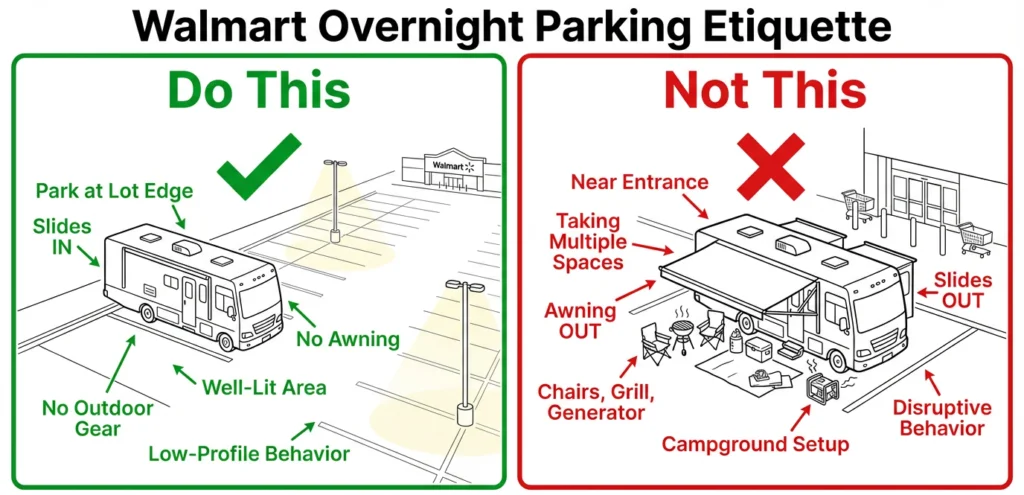
Walmart overnight parking etiquette

RVer behavior is one reason stores stop allowing overnight stays. You can control that part.

Side-by-side comparison of an RV parked low-profile at a Walmart lot edge versus one set up like a campground with awning and chairs

  • One night only. Arrive in the evening and leave by mid-morning.
  • Park at the edge. Stay clear of entrances, fire lanes and loading docks.
  • No campground setup. No awnings, chairs or grills. Keep slides in where you can.
  • Shop inside. A purchase gives the manager a reason to keep saying yes.
  • Leave no trace. Never dump tanks or trash in the lot.

The full etiquette list is in our free overnight RV parking guide.

Frequently asked questions

Does Walmart allow overnight RV parking?

Sometimes. Walmart’s FAQ says store managers grant permission to park based on parking space and local laws. There is no chainwide yes. A city or township ordinance can override a manager’s yes. Call the specific store before you arrive and verify current local rules before departure. Checked November 28, 2026.

Do all Walmart stores allow overnight parking?

No. Each store manager decides, and local ordinances, landlord rules and lot closure orders can bar overnight stays. Walmart does not publish a list of stores that allow it. Call the store, ask for a manager, and check the city or township code before you settle in for the night.

How do I check if a specific Walmart allows overnight parking?

Call the store and ask for a manager. Ask if one night is allowed and where to park. Then check the city or township code for rules on sleeping in vehicles on commercial lots. Apps like AllStays help you screen stores, but their reports can be out of date.

What if there is a No Overnight Parking sign?

Ask who posted it. A sign can come from the store, the shopping center landlord or a city rule. If a city ordinance is behind it, a manager cannot waive it. If the landlord posted it, ask the manager whether the store can grant an exception. Get a clear answer before you stay.

Can I stay more than one night at Walmart?

Plan on one night only. Walmart’s FAQ leaves permission to each store manager, and long stays are a common reason stores stop allowing RVs. If you need a second night, ask the manager again. For longer stays, use a campground, a membership stop or public land.

Store rules and local ordinances change. Call the specific store and verify current local rules before your trip. This guide does not constitute legal advice.

How to Work Remotely While Boondocking: Power, Internet and Stay Limits

How to Work Remotely While Boondocking: Power, Internet and Stay Limits

Last updated: November 27, 2026. Starlink Roam and Visible plan prices were read on each provider’s own page on November 27, 2026. Starlink referral terms were checked November 21, 2026. Confirm current rates and terms before you buy.

By Chuck Price. Chuck has 35+ years of RV camping experience and travels in a 2018 Hymer Aktiv Class B. He was featured on CBC Radio’s “Cost of Living” in 2024.

Quick Answer

To work a full day off-grid you need three things. First, a battery bank and solar array sized to your own measured daily draw, for the route and month you plan to travel. Second, an internet connection with a backup on a different network. Third, a legal place to park. There is no single solar wattage that works everywhere. My van has 250 W of roof solar and a 7,680 Wh lithium bank. My example workday draws about 1,075 Wh before the Starlink dish. Starlink lists US Roam plans at $55, $80 and $175 a month (read November 27, 2026). The BLM says dispersed camping is generally limited to 14 days within any 28-day period, with local rules that vary.

Referral disclosure: This page contains a Starlink referral link. Boondock or Bust may receive a Starlink referral reward if you make an eligible purchase through it, at no extra cost to you. Other products named here are examples or part of our own van, as each section says. We do not earn from them.

Cindy and I have been taking RV trips for more than 35 years. We travel part-time. We are out as often as we can be from Memorial Day through October, mostly in the Northeast, the Mid-Atlantic and the Midwest. I work from the van on those trips. Most boondocking advice is written for a weekend of lights and a water pump. A workday of laptops and video calls asks more of a battery and far more of a data connection.

This guide uses the setup in our 2018 Hymer Aktiv Class B and the published prices and rules checked on the dates shown. My power numbers are estimates from real use. They are not a logged record, so measure your own gear before you size anything.

Remote Work vs. Workcamping: Run the Numbers on a Real Offer

Workcamping trades hours of labor for a campsite, and sometimes wages. Remote work keeps your salary while you pay for your own site. There is no reliable national average for either side. Campsite values, hours and pay are set by each agreement, and camping costs depend on the site and any permit fees. Compare a specific offer against your own job.

Workamper News shows how to value an offer: turn the required weekly hours into monthly hours with 4.33 weeks a month, then compare that with what the site would cost you. Add any wages, bonuses and perks. Divide by the number of people working for the site.

Worked example (inputs are assumptions, not averages)

  • Offer: a campsite you would otherwise pay $700 a month for, no wages, in exchange for 22.5 hours of work a week by one person.
  • Monthly hours: 22.5 hours × 4.33 weeks = about 97.4 hours.
  • Effective rate: $700 ÷ 97.4 hours = about $7.19 an hour, before taxes and with no benefits stated.
  • If you count a month as four weeks, you get 90 hours and $7.78 an hour. That overstates the rate, because a calendar month averages more than four weeks.
Factor Workcamping Remote work while boondocking
Compensation Campsite, plus any wages and perks in the agreement Your existing salary
Monthly camping cost Set by the agreement Depends on the site and any permit fee
Weekly hours owed to the camp Set by the agreement None
Location The host’s property for the season Sites where camping is allowed and local rules permit your stay
Upfront equipment Depends on the site’s hookups Power and internet gear sized to your load. Cost depends on what you already own.
Schedule Set by the host Set by you and your employer or clients

Workcamping can suit people who want community and a set routine. Whether it pays depends on the specific job and campsite agreement. For trip-level costs, see our boondocking cost breakdown and our overview of work camping jobs.

Where You Can Park and Work: Stay Limits on Public Land

The BLM says dispersed camping is generally limited to 14 days within any 28-day period, and that specific limits vary by state and field office. How far you must move after the limit is set locally, so check the rule for your area. The BLM also says dispersed camping is for short-term recreation, not long-term living. Source: BLM, Camping on Public Lands, read November 27, 2026.

National Forest rules are set forest by forest. The Forest Service says dispersed camping rules may vary by forest and that your stay may be day limited. Permission to camp does not by itself cover every activity, so check any local order that applies to your setup. Verify stay limits, road access, closures and fire restrictions with the BLM field office or ranger district that manages the area before you leave. Our BLM camping rules guide goes deeper. Nothing here is legal advice.

Power: Size the System to Your Measured Workday

Add up the watt-hours your work gear uses in a day, then compare that total with your battery capacity and your expected solar input. Watts times hours gives watt-hours. There is no universal minimum solar size. Model the route and month you plan to work, count every load including the internet dish, and allow for shade and conversion losses. Run short in the middle of a workday and you can lose a call.

What an example workday draws

Here is our typical 8-hour workday in the Hymer Aktiv, as an estimate from real use:

Device Draw Hours a day Daily Wh Note
Two laptops 75 W total 8 600 Varies by model. Measure yours.
Portable monitor 25 W 8 200 USB-C powered preferred
Wi-Fi router or hotspot 15 W 8 120 Starlink dish draws more on startup
Phone charging 8 W average 5 40
LED lighting, two lights 10 W total 4 40 5 W per light, 2 lights = 10 W total
Coffee maker 900 W 5 minutes 75 Run during peak solar hours
Daily total About 1,075 Based on our typical usage

These figures are usage estimates from Chuck Price’s typical day, not a metered log. Each row is watts times hours: 600 + 200 + 120 + 40 + 40 + 75 = 1,075 Wh. The total does not include the Starlink dish, so add your dish’s draw separately. Your draw will vary by equipment. Measure it with a plug-in watt meter or a battery monitor before you size a system.

Battery types: read the datasheet, not the label

  • Flooded lead-acid and AGM: lower upfront cost. How deeply you can discharge them, and how many cycles they last, depends on the model. Use the maker’s rated usable capacity and cycle life, not the amp-hour label alone.
  • Lithium (LiFePO4): higher upfront cost. We replaced the Hymer’s factory lithium batteries with two Epoch 300 Ah batteries. Epoch lists its current 12 V 300 Ah model at 12.8 V nominal and 3,840 Wh per battery, with 4,000+ cycles rated at the depth of discharge, charge rate and temperature stated on its datasheet.

The power system in my Hymer

Power system, 2018 Hymer Aktiv Class B

  • Solar: 250 W of roof solar, roof mounted.
  • Battery bank: 2 × Epoch 300 Ah lithium (LiFePO4) at 12.8 V nominal, 600 Ah and 7,680 Wh total. Epoch lists 12.8 V, 300 Ah and 3,840 Wh per battery.
  • Inverter: the original factory inverter, kept when the batteries were replaced.
  • Battery monitor: Victron BMV-712 Smart.

Example solar input: 250 W × 5 peak sun hours × 80 percent system efficiency = 1,000 Wh a day under those assumptions. That is 75 Wh short of the 1,075 Wh example workday, before the Starlink dish. So on these numbers the panels alone do not cover the workday, and the bank makes up the gap. Your sun hours depend on latitude, season, roof angle and shade.

Example storage: 7,680 Wh ÷ 1,075 Wh = about 7.1 workdays on paper with no solar at all. That is a nominal figure before inverter and conversion losses and the van’s other loads. It is a calculation, not a measured runtime. On our trips, the van goes several days between charges.

For comparison, a smaller 200 Ah bank at 12 V holds 200 × 12 = 2,400 Wh nominal before losses. Against the same 1,075 Wh example day, that is 2,400 ÷ 1,075 = about 2.2 days on paper, so daily recharging matters more. Model your own roof with the free PVWatts calculator, which estimates monthly solar production for a location and panel setup. Our RV solar power guide covers system design.

What a battery monitor shows, and what it does not

A shunt-based monitor such as the BMV-712 measures current at the battery bank. It shows the net flow in or out and the state of charge. It does not label which device is drawing, and it cannot separate solar input from appliance draw when both happen at once. To find one device’s draw, switch it on by itself and watch the change, or use a plug-in watt meter.

Ways to stretch the bank

  • Run high-draw tasks, such as video calls, large uploads and the coffee maker, when the monitor shows the system is producing a surplus.
  • Switch off the inverter and unplug idle chargers when you are not using them.
  • Never switch off the propane alarm or the carbon monoxide alarm to save power. They only protect you while they are powered.

Size for your worst working month

Low sun and short days reduce solar output, and the loss depends on where you are and when. There is no fixed winter percentage that fits every route. Size your system against your worst expected working month, not your best summer trip. Run that month and location in PVWatts. Its own help page calls the results estimates for very preliminary studies, so leave a margin.

Connectivity: A Primary Link and a Backup on Another Network

Plan on two independent connections, because no single one works everywhere. Satellite needs open sky and cellular needs a usable signal, so each can fail in different places. Weather, obstructions and outages can interrupt Starlink, so a cellular backup matters most on days with client calls.

I learned this the slow way. We have carried Boost Mobile, which uses the T-Mobile and AT&T networks, and Visible, which uses Verizon, on the road. In some places one worked, in some both worked and in some neither did. Those were everyday use, not measured tests. That is why Starlink became our primary connection. We now travel with a Starlink Mini on a Roam plan. Signal in remote areas depends on terrain and distance to the nearest tower, so switching carriers does not always help. Your results will depend on your region and the carriers there.

What a work connection needs

  • Enough upload and download for your calls. Zoom lists 2.6 Mbps up and 1.8 Mbps down for a group call in 720p HD, and 3.8 Mbps up and 3.0 Mbps down in 1080p HD. Zoom lists much lower figures for audio-only calls and screen sharing. Test upload as well as download.
  • Reliability during your work hours, not just on average across the day.
  • Low latency for calls, shared documents and other real-time tools.
  • Enough data. Video calls use the most. Check your plan’s allowance and what happens after you use it.

Primary: Starlink Roam

  • Hardware: kit prices depend on the model and current offer. Check current Starlink kit prices and referral eligibility
  • Monthly service: Starlink lists US Roam 100GB at $55, Roam 300GB at $80 and Roam Unlimited at $175 a month, read November 27, 2026. Taxes, hardware and accessories are extra. Verify current plan prices
  • Starlink can work at many BLM and National Forest dispersed sites where camping is allowed, the dish has a clear view of the sky and local rules do not restrict your setup. Tree canopy, canyon walls and terrain are the usual obstacles. Use the obstruction checker in the Starlink app before you settle on a site.
  • Speed varies with congestion, weather, obstructions and location.
  • For us, Starlink made some sites with no cell service workable for work, when the site had open sky.
  • Roam is sold for travel. We could not read Starlink’s current US service terms on November 27, 2026, so check them yourself for any limit on business use before you rely on Roam for paid work. On routes with dependable cellular coverage, a hotspot may be enough.

New customers who order an eligible Roam plan directly through this referral link may qualify for a Starlink reward. Check Starlink’s current offer and eligibility before ordering. Existing or returning customers, retail purchases, and transferred kits are not eligible. Starlink referral terms, checked November 21, 2026.

Referral disclosure: Boondock or Bust may receive a reward if you make an eligible purchase through our link. We are independent publishers, not Starlink representatives.

Backup: cellular on a different network

  • A second carrier on a different network. Pick one that is not on the same network as your phone.
  • Visible lists the Visible plan at $25, Visible+ at $35 and Visible+ Pro at $45 a month, taxes and fees included, read November 27, 2026. Hotspot speed is capped at up to 5 Mbps, 10 Mbps and 15 Mbps on those plans. Check the cap before you count on a hotspot for calls.
  • Carrier coverage maps are models. The FCC says mobile coverage on its National Broadband Map comes from provider propagation modeling and that actual experience may vary with device, network capacity and terrain. Treat a spot as unknown until you have tested it.

Last resort: public Wi-Fi

Apps such as WiFi Map list crowdsourced public Wi-Fi spots. A library or cafe can be a fallback when both of your connections fail.

Check coverage before you commit to a site

Coverage Critic says its maps draw on FCC data and crowdsourced signal measurements, and that it shows predicted outdoor signal. It also says it receives commissions from carriers. Treat a predicted signal as an estimate, and treat sparse or missing reports as no information, not as confirmed coverage.

Example monthly cost: Starlink Roam at $55 to $175 plus the $25 Visible plan comes to $80 to $200 a month. That is a sum of the list prices read November 27, 2026, not a quote. Starlink taxes, hardware, accessories and the RV power system are extra. For plan choices in depth, see our RV internet guide and our guide to where Starlink data goes.

Test your full connectivity stack close to home before any trip where a failure has professional consequences. Run speed tests on both the primary and the backup during your normal work hours. A bad result at home is easy to fix.

Illustration of a camper van with a rooftop dish and a wireless-signal symbol.
Illustration of connectivity while traveling by camper van.

Schedule: Put Heavy Work Where the Sun Is

Do the power-hungry work when your panels produce the most and the light work at the edges of the day. When that happens depends on season, latitude, roof angle and shade, so watch your battery monitor rather than the clock. The blocks below are an example, not a promise of solar output.

Block Example work What to watch
Early morning Email, planning, light writing Low-draw, low-bandwidth tasks while solar input is still low
Midday Video calls, large uploads, high-draw tasks, coffee maker Schedule these when the monitor shows a surplus
Lunch break Lunch, a walk A lighter load gives the panels a chance to add to the bank
Afternoon Focused writing, reading, lower-draw tasks Expect more of the load to come from the battery as the sun drops
Evening Wrap up, switch off non-essential loads Check the state of charge before the night

On an overcast day the bank carries more of the load. With our 7,680 Wh bank, the calculation above gives about 7.1 workdays on paper for the example loads with no solar input, before losses. That is a calculation, not a guarantee, so keep an eye on the state of charge during a long cloudy stretch.

Workspace: Set One Spot Up Properly

Pick one place in the rig as your desk and raise the screen to eye level. Makeshift setups, such as a dinette table at the wrong height or working from a bed, can strain your back and neck in any size of vehicle. OSHA describes ergonomics as fitting the job to the person. Its principles are a useful reference for a mobile workspace. Source: OSHA, Ergonomics.

  • Screen height: a laptop stand or riser that packs flat and brings the screen to eye level.
  • Keyboard and mouse: a separate wireless keyboard and mouse, so the raised laptop screen does not force your hands up.
  • Heat: where you can, cool the workspace with small USB fans instead of the roof air conditioner, and check each fan’s draw on your monitor. Where the site layout and safety allow, keep the workspace out of direct afternoon sun.

Set a hard stop

The harder problem is stopping. When the desk is a few feet from the bed, work can spread into the evening. The American Psychological Association’s 2023 Work in America survey found that 32 percent of workers said they lack enough flexibility to balance work and personal life. That survey covers workers in general, not people working from RVs. Some ideas to try:

  • A physical cue: a lamp that is on only during work hours. When it goes off, the workday is over.
  • An end-of-day calendar block: create a Google Calendar event to mark the end of your workday.
  • A shutdown routine: close the work tabs, write tomorrow’s top three tasks and put the laptop away in the same place every day.

Planning Checks Before Your First Work Trip

  • Size for winter or your worst month. Shorter days and a low sun angle cut solar output. Model your actual route and month in PVWatts.
  • Check idle loads. Small loads add up while you are away from the rig. Common ones are an inverter left on and chargers with nothing plugged in. Your battery monitor shows the total net draw, so switch loads off one at a time to find them. Keep the propane and carbon monoxide alarms powered.
  • Do not trust a coverage map alone. Carrier and FCC maps are modeled. Check crowdsourced reports and test on site before you commit to a workweek.
  • Test carriers in your own area. Results vary by region. If you add a cellular booster, verify current carrier and FCC setup and registration requirements first.
  • Check the sky before you level the rig. Dense canopy and canyon walls can block Starlink. Use the obstruction checker in the Starlink app at the site.
  • Park with the panels in mind. Where the site layout and safety allow, park where the roof panels get the least shade during your work hours, on level ground, facing so you could leave quickly if needed.
  • Sizing from someone else’s numbers. Measure your own gear for a full workday first.
  • First test on a deadline day. Run a short trial trip close to home with a real work schedule.

Frequently Asked Questions

How much solar and battery do I need to work remotely while boondocking?

Add up your own daily watt-hours first. Our example workday for two people is about 1,075 Wh, before the Starlink dish. With 250 W of panel, an assumed 5 peak sun hours and 80 percent efficiency give about 1,000 Wh, so the bank covers the rest. Our 7,680 Wh bank works out to about 7.1 such days on paper with no sun, before losses. There is no universal minimum. Model your route and month in PVWatts.

Do I need to be an expert in solar and batteries?

No. The core idea is that watts times hours equals watt-hours. A battery monitor shows the net flow in and out of the bank as you work. If you would rather not do the work yourself, an RV solar installer can design and install a system to your requirements.

Can I work from a site with no cell service?

Sometimes. For us, Starlink has made some no-cell-service locations workable when the site had a clear view of the sky. It does not work well under heavy canopy, in deep canyons or anywhere the sky is blocked. Check the obstruction view in the Starlink app before you commit, and use the free campsite apps to find open sites.

Can you use Starlink on BLM land?

It is often possible but not guaranteed at every site. Starlink Roam is sold for travel, and it can work where camping is allowed and the dish has a clear view of the sky. Terrain, canopy and local rules decide whether it works in practice. Verify the rules with the BLM field office or ranger district before you rely on the site for work.

What is a good cellular backup for Starlink?

A plan on a different network from your phone. We have carried Boost Mobile and Visible as cellular backups. In some places one worked, in some both worked and in some neither did. Check the hotspot speed cap on any plan, because it limits video calls. If you add a booster, verify current carrier and FCC setup and registration requirements first.

Does cold weather affect lithium batteries?

Yes. Epoch says charging lithium cells below freezing (32°F) can damage them, and its battery management system will not start charging while the cells are below that point. Check how your own battery handles cold charging before a cold trip.

Is it legal to work remotely from a BLM campsite?

In many BLM and National Forest dispersed areas, working from your campsite may be allowed when camping itself is permitted and no local rule, permit condition or land-use restriction prohibits what you are doing. The BLM says dispersed camping is generally limited to 14 days within any 28-day period, with limits that vary by state and field office. National Forest rules vary by forest. We are not lawyers and this is not legal advice. Verify the current rules with the managing office before your trip.

How much upload speed does a video call need?

Zoom lists 600 kbps up and down for a one-to-one call in high-quality video, 1.2 Mbps for 720p HD, and 2.6 Mbps up and 1.8 Mbps down for a group call in 720p HD. Test both upload and download during your normal work hours.

Is the equipment worth the cost?

It depends on your gear, your recurring service costs and how often you would otherwise pay for hookup sites. Price the equipment you actually need, add the monthly service, and compare that with the campground fees you expect to avoid on your own route. If upfront cost is the barrier, you can start with the internet hardware and a battery bank sized to your measured load, and add solar later.

Your Next Steps

Get our boondocking newsletter

New guides on power, connectivity and where to park, sent to subscribers.

Sign Up Free →

  1. Measure your daily draw. Use a plug-in watt meter for each device, or a battery monitor, for one full workday. Your numbers will differ from ours.
  2. Model your solar. Use PVWatts to compare generation against your load for your target region and worst expected month.
  3. Test both connections at home. Run upload and download tests on the primary and the backup during your normal work hours.
  4. Take a short trial trip close to home with a real work schedule. Fix what breaks.
  5. Choose a legal site. Use the free campsite apps to find candidates, then verify access, stay limits and permit requirements with the BLM field office or ranger district before you go.

Questions? Leave them in the comments below.

Before you go. Land access, permits, road conditions, fire restrictions and stay limits change. Verify them with the land management agency before your trip. Remote sites can be far from help, so tell someone where you will be and keep a way to call for help that does not depend on one network.

Transparency: This article contains one referral link, to Starlink. Boondock or Bust may receive a Starlink referral reward on an eligible purchase, at no additional cost to you. Starlink and Visible plan prices were read on November 27, 2026. Starlink referral terms were checked November 21, 2026. Prices and terms change, so verify them with each provider before you buy. The workday power table is an estimate from our use. The workcamping figures and the monthly cost example are labeled examples and sums of list prices, not quotes.

About the Author

Chuck Price has been RVing with his wife Cindy for 35+ years and travels in a 2018 Hymer Aktiv Class B. He works remotely from the road and shares power numbers based on his own usage. Chuck was featured on CBC Radio’s “Cost of Living” in 2024. He publishes field-tested boondocking guidance at Boondock or Bust.

Sources

  1. Bureau of Land Management, Camping on Public Lands. Read November 27, 2026. Stay limits and move requirements vary by field office.
  2. USDA Forest Service, Intermountain Region, dispersed camping. Read November 27, 2026. Rules vary by forest and ranger district.
  3. Workamper News, Doing the math on a Workamping opportunity. Read November 27, 2026.
  4. Epoch Batteries, 12V 300Ah Group 31 lithium battery. Read November 27, 2026.
  5. Victron Energy, BMV-712 Smart. Read November 27, 2026.
  6. PVWatts Calculator and its Get Started help page. Read November 27, 2026.
  7. Zoom, system requirements and bandwidth. Read November 27, 2026.
  8. Starlink, Roam plans. Prices read November 27, 2026.
  9. Starlink, referral terms. Checked November 21, 2026.
  10. Visible, plans. Read November 27, 2026.
  11. Federal Communications Commission, What’s on the National Broadband Map. Read November 27, 2026.
  12. Coverage Critic, cell coverage maps. Read November 27, 2026.
  13. Occupational Safety and Health Administration, Ergonomics. Read November 27, 2026.
  14. American Psychological Association, 2023 Work in America Survey. Read November 27, 2026.
  15. Google Calendar Help, Create an event. Read November 27, 2026.
  16. Price, C. Typical off-grid power use, 2018 Hymer Aktiv Class B (2 × 300 Ah 12.8 V LiFePO4, 250 W solar, Victron BMV-712). Author’s estimates from real use, not a logged record.
How to Find and Manage Potable Water While Boondocking

How to Find and Manage Potable Water While Boondocking

RV Boondocking Water Management: Fresh and Potable Water

How to store, find, filter, and conserve fresh water while camping off-grid.

Safety and planning review: | Author: Chuck Price, Boondock or Bust

Plan boondocking water around your household’s measured daily use, an accessible potable reserve, and confirmed refill access. A 40-gallon tank has no fixed trip duration. Divide the usable gallons after your reserve by actual daily consumption. Include every traveler, pets, cooking, hygiene, and water carried on hikes.

Water safety: Fill from a supply the operator designates as potable, check current advisories, and get permission. Clear water, normal odor, and a low total dissolved solids (TDS) reading do not prove safety. A jug refill machine may not allow RV tank fills. CDC explains the limits of water treatment.

  • Measure total household water use before estimating days off-grid.
  • Keep potable water and equipment separate from wastewater and sewer equipment.
  • Carry reserve drinking water you can access without the RV pump.
  • Confirm refill services, permissions, fees, season, and current conditions before departure.

Open the RV Water & Dump Station Finder

Trip conditions: Land access, permits, road conditions, and site availability change. Verify current information with the operator or land management agency before your trip. Remote conditions can be hazardous. Match your equipment and plans to the location and your experience.

How the RV fresh water system works off-grid

An RV fresh water tank provides a finite supply for drinking, cooking, washing, and other onboard uses. The pump moves stored water to the fixtures when the RV is not connected to an outside pressurized supply. Tank capacity alone does not determine trip length. For example, a household using five gallons daily needs a different refill plan from a household using ten. Those are arithmetic examples, not recommended consumption limits.

Before a trip, find the fresh tank’s usable capacity, the pump shutoff, and the manufacturer’s filling and sanitation instructions. Know how to read the tank monitor, but account for its measurement limits. Keep a written water-use log if the gauge gives only rough levels.

Your boondocking plan also needs power, waste capacity, and an accessible way to obtain drinking water if the pump stops. A full tank does not help if you cannot draw water from it.

Protect essential uses. Reduce unnecessary rinsing and convenience tasks before cutting drinking water or proper hygiene. If your supply cannot meet everyone’s needs, refill or leave camp sooner.

Measure your daily fresh water use

Use your household’s measured consumption to estimate how long your water will last. A generic allowance cannot account for your travelers, pets, fixtures, meals, weather, or activities. Measure under conditions similar to the planned trip. If a hypothetical household uses five gallons daily, a 30-gallon usable supply lasts six days before another constraint or changing conditions require an earlier refill. Reserve water must already be excluded from those 30 gallons.

  • Start with a known amount of potable water and record the starting tank level.
  • Track drinking, cooking, washing, toilet use, pets, and water taken away from the RV.
  • Record refills and any separate jugs used during the measurement period.
  • Repeat across several representative days. Use the results to plan a reserve and a refill stop.

Heat, activity, additional travelers, pets, illness, and changes in cooking or hygiene can increase demand. Cold conditions can freeze water lines or close refill points. Do not apply a fixed percentage adjustment or assume cold weather makes a tank last longer. Revisit the plan when conditions change.

15 fresh water conservation techniques

Shorter showers, closed taps between tasks, and separate wash and rinse containers can reduce unnecessary water use. The National Park Service recommends these conservation practices. Savings depend on your fixtures and habits. Measure your own results rather than adding estimated gallons from a list. For example, collect clean potable warm-up water before it touches a person or dirty surface, then use it for another suitable task.

1. Take navy showers

Wet down, turn the water off while soaping, and turn it on again to rinse. Use enough water for effective cleaning. The amount used depends on flow rate and running time.

2. Wash dishes in a basin

Scrape dishes first, then use separate wash and rinse containers with safe water. Follow appropriate cleaning and sanitation practices. Do not use unknown or unsafe water for dishes.

3. Capture clean warm-up water

Collect potable water in a clean container while waiting for hot water, before it contacts your body, the basin, or dirty surfaces. Keep it covered and clean. Used dishwater and shower water are wastewater, not a potable reserve. See other shower options while boondocking when onboard water is limited.

4. Turn off taps between tasks

Close the tap while brushing teeth, lathering, or shaving. Keep enough safe water available for proper handwashing and rinsing.

5. Control rinsing water

A clearly labeled bottle of potable water can help control small rinses. A spray bottle does not replace proper handwashing, dishwashing, or sanitation.

6. Use a dedicated drinking jug

Keep a clean, covered potable jug readily accessible. Avoid running the faucet just to wait for colder water. Carry enough drinking water for the conditions.

7. Plan meals with fewer dirty pans

Choose meals that limit cookware when water is scarce. Allow enough safe water for food preparation, washing hands, and cleaning food-contact surfaces.

8. Scrape before washing

Remove food scraps and grease before dishes enter the wash basin. Collect scraps for appropriate trash disposal instead of sending them down the drain.

9. Use body wipes between showers

Body wipes can supplement personal cleanup when suitable. Follow the product instructions, pack out used wipes, and do not substitute them for required handwashing.

10. Check low-flow fittings

A lower-flow faucet aerator or showerhead can reduce flow while operating. Choose fittings compatible with your RV and retain enough flow for the task.

11. Carry a manual backup

A compatible hand pump or spout can make a separate potable jug usable if the electric pump fails. Test the fit and access before leaving home.

12. Avoid repeated warm-up waste

Group compatible tasks when practical. Use a clean container to capture potable water while a line warms up rather than leaving it running into the drain.

13. Remove grease before adding wash water

Wipe cookware after it cools and before washing. Keep grease out of drains and dispose of used towels with your trash.

14. Plan laundry stops

Include laundry in the water budget if you wash in the RV. A laundromat stop can avoid drawing that water from your onboard supply.

15. Refill with a margin

Plan a confirmed refill before your usable supply runs low. Account for fees, hours, closures, vehicle weight limits, and the possibility that the planned fill point is unavailable.

Keep captured clean water, utility water, and gray water separate. Never pour used rinse water or gray water into potable storage. Follow the site’s wastewater rules. For example, Glacier National Park’s developed-campground sanitation guidance requires shower and dishwashing wastewater to be contained and disposed of in utility sinks or at RV dump stations. Other locations have their own rules.

Navy shower and basin dish washing setup inside an RV galley

Fresh water storage and containment setup

Carry potable reserve water in clean, food-grade containers that remain accessible without the RV pump. The CDC recommends at least one gallon per person per day for three days for an emergency supply. That emergency baseline is not a full RV domestic-use budget. Plan additional water for heat, pets, illness, and other needs. Choose container sizes you can safely lift and secure within the RV’s weight limits.

Never use a container that previously held fuel, cleaners, or other toxic substances. Label containers by contents and fill date. Store reserve jugs in a cool place out of direct sunlight. CDC recommends replacing water you fill for storage every six months. Follow your RV manufacturer’s separate instructions for tank cleaning and sanitation.

Potable storage and fill equipment: select components that fit your RV and intended use.
Item Use What to check
Food-grade potable jugs Accessible reserve water Cleanliness, closure, lift weight, secure storage, and total vehicle load.
Compatible hand pump or spout Access without the electric RV pump Test the fit, flow, and ability to reach the jug.
Drinking-water-safe hose Permitted potable tank fill Look for a drinking-water label. Hose color alone is not proof.
Clean fittings and caps Keep potable connections protected Store separately from sewer hoses and dump-station equipment.
Appropriate filter, when needed Treat the contaminants specified by its manufacturer Check its exact capabilities, maintenance instructions, and replacement schedule.

A TDS meter is not an essential safety check. The University of Maryland Extension explains that TDS measurement “does not identify the individual compounds or their sources”. A dissolved-solids reading cannot certify that water is safe to drink.

Aqua-Tainer emergency water jugs with hand pump stored in an RV

Filtration and potable water safety checks

Use a designated potable supply for routine RV tank fills. Confirm the operator permits your intended use and check current drinking-water advisories. A normal appearance, normal odor, or low TDS reading does not establish safety. An RV water filter treats only the contaminants its manufacturer specifies. For example, a sediment-and-taste filter should not be treated as a system that makes unknown or non-potable water safe.

The CDC states, “Boiling is the best way to kill germs in water.” When boiling is not possible, CDC’s next option is filtering followed by disinfection. Follow the instructions for the specific treatment method and equipment. Do not use an untreated spring, river, or other unknown source as a casual RV tank fill.

Germ treatment does not solve every contamination problem. The CDC warns that boiling or disinfecting cannot make water containing fuel or toxic chemicals safe. Use another safe source if chemical contamination is suspected. Do not use unsafe water for drinking, brushing teeth, preparing food, washing dishes, or washing hands.

Potable fill checklist

  • Confirm the operator identifies the supply as potable and permits your RV tank or jug fill.
  • Check for current boil-water, do-not-drink, or do-not-use advisories and follow the issuing authority’s instructions.
  • Confirm fees, payment method, opening hours, seasonal access, and any customer or camping requirement.
  • Use a dedicated drinking-water-safe hose and clean fittings. Keep them separate from wastewater equipment.
  • Use the designated potable connection. Do not use a dump-station rinse hose or an unmarked rinse spigot for fresh water.
  • Reject a source if the water or connection appears contaminated. Clear appearance or normal odor does not clear it for use.

If the operator cannot confirm the source or intended use, choose another fill point. A directory listing, community review, or filter purchase is not a water test.

What to do when your water pump fails

Switch to your accessible potable reserve if the electric water pump stops. Water remaining in the tank may be difficult to use without a working pump or another manufacturer-approved access method. This backup works only if you prepared it before the failure. For example, a clean jug with a compatible hand pump can supply drinking and cooking water while you arrange repairs or move to a place with reliable services.

  • Protect drinking water and essential hygiene. Postpone nonessential washing if your supply is limited.
  • Use the clean spout or hand pump fitted to your reserve jug. Keep the outlet protected from contamination.
  • Identify the pump model and find the RV and pump manufacturer’s troubleshooting instructions.
  • Keep electrical troubleshooting, repairs, and replacement within your skills. Use qualified service when needed.
  • Refill or leave camp if available water cannot meet everyone’s needs until the repair.

Before a trip, turn off the RV pump and try serving a meal from your reserve setup. Check whether you can reach the jug, dispense water without contamination, and lift or secure the containers safely.

Where to find potable water while boondocking

Look for an operator-confirmed potable fill that supports your intended container or RV tank. Municipal facilities, campgrounds, RV parks, and travel centers may offer fills, but the service is location-specific. A water listing does not guarantee hose access or permission. For example, Guadalupe Mountains National Park distinguishes bottle and hydration-pack filling from prohibited RV hose fills. Check the actual service before driving there.

Refill options: confirm current services and permissions with the individual operator.
Source type Potential use What to confirm
Municipal or public facility RV tank fill or jugs where expressly permitted Designated potable connection, hours, fees, vehicle access, and fill rules.
RV park or campground Tank fill for eligible customers Whether noncampers may fill, whether a reservation or day fee is required, and seasonal status.
Travel center or fuel station RV tank fill where offered Exact location, potable designation, permission, access, and purchase requirements.
Filtered refill machine Drinking-water jug refill Container size, machine operation, price, and whether hoses or RV tank fills are prohibited.
Visitor center or park bottle filler Portable bottle or jug fill where permitted Volume restrictions and whether bulk RV fills are allowed.

Use the RV Water & Dump Station Finder to compare listed services and access restrictions. Check each listing’s source and review date, then confirm current conditions with the operator. A source-check date is not a water-test date or a guarantee the facility is open.

Apps such as iOverlander, Campendium, and AllStays Camp & RV can provide leads. User reports become outdated. Cross-check the operator’s page, recent advisories, and current permissions before relying on a stop.

Do not assume a day pass includes water or dump access. Ask separately about each service. For extended desert stays, review the permit and service details in our LTVA camping guide.

Boondocking fresh water calculator

Estimate days off-grid by dividing usable water after your reserve by measured total daily household use. Include any accessible potable jugs you intend to use, but do not count the reserve twice. The result is a planning estimate, not a hydration limit. For example, a hypothetical 40-gallon starting supply minus a 10-gallon reserve leaves 30 usable gallons. At a measured five gallons daily, that gives six days before reaching the reserve.

Estimated days = (available potable gallons − reserve gallons) ÷ measured household gallons per day.
Use the same units throughout. Daily use must be greater than zero. Refill sooner when conditions, access, water quality, power, or waste capacity require it.

To run this formula alongside your gray and black tanks, battery, and propane, use the RV off-grid planner. It shows which resource runs out first.

Worked examples only. Daily-use values and reserves below are hypothetical inputs, not recommended allowances.
Starting potable supply Reserve Measured household use Days before reserve
40 gallons 10 gallons 5 gallons/day 6 days: (40 − 10) ÷ 5
60 gallons 10 gallons 5 gallons/day 10 days: (60 − 10) ÷ 5
60 gallons 10 gallons 10 gallons/day 5 days: (60 − 10) ÷ 10
90 gallons 15 gallons 10 gallons/day 7.5 days: (90 − 15) ÷ 10

For additional travelers or pets, update total household consumption rather than dividing a two-person estimate by the new head count. Budget hiking water separately if it was not included in your measurements. Choose a refill time before the calculated limit and keep a backup location.

Hydration for hikes and off-RV excursions

Plan hiking water separately from water used at camp. Carry enough for the route, conditions, people, and pets, and check current land-manager guidance before leaving. A general RV tank estimate is not a hiking hydration prescription. For example, the Grand Canyon National Park hiking FAQ addresses water, food, heat, and changing water availability for its routes. Apply the guidance for your actual destination.

Check whether advertised trail water is currently available. Carry food, suitable containers, and a plan for unexpected delays. Do not depend on untreated natural sources. If you cannot carry the water needed for the conditions, change the route or timing.

Plan water and a bowl for pets. Do not assume natural water along the route is safe. Confusion, collapse, or suspected severe heat illness requires urgent medical help, not a decision to continue the hike.

Frequently asked questions

How long can I boondock with a 40-gallon fresh tank?

There is no fixed duration. Subtract your reserve, then divide by measured daily household use. As a hypothetical example, 40 gallons minus a 10-gallon reserve leaves 30 gallons. At five gallons per day, that is six days before reaching the reserve. Refill sooner if conditions or other RV limits require it.

How much drinking water should I carry separately?

Keep an accessible reserve sized for your travelers, pets, conditions, and refill contingencies. CDC’s emergency baseline is at least one gallon per person daily for three days, with more for certain needs. That is emergency guidance, not an allowance for all RV cooking, washing, toilet use, and activities.

Can I drink water from a campground or public spigot?

Confirm the operator designates the supply as potable, allows your intended fill, and has no current advisory affecting its use. Use clean drinking-water equipment. Clear water, normal odor, and a low TDS reading do not establish safety. An unmarked spigot or dump-station rinse connection is not a potable fill.

What is the easiest way to save RV water while boondocking?

Start with closed taps between tasks, shorter showers, and separate wash and rinse basins. Measure the change under your own camping conditions. Keep enough safe water for drinking, food preparation, handwashing, and proper cleaning. Do not treat spray bottles, wipes, or unsafe water as substitutes for necessary hygiene.

What should I do if my RV water pump stops working?

Switch to accessible potable jugs with a clean spout or compatible manual pump. Protect drinking water and essential hygiene while arranging repairs. Follow the manufacturer’s troubleshooting instructions and get qualified help when needed. Refill or leave camp if available water cannot meet everyone’s needs until service is restored.

Should I fill my fresh tank every time I go to town?

Refill when it supports your water plan and the operator permits it. Confirm a potable supply, current access, fees, and filling rules. Account for the RV’s payload and manufacturer’s limits before adding water. A convenient spigot is useful only if the source, access, and intended fill are suitable.

How do I keep stored RV water from tasting bad?

Use clean, food-grade containers and dedicated drinking-water equipment. Keep reserve jugs cool and out of direct sun, and follow the RV manufacturer’s sanitation instructions. Taste and odor do not establish safety. If contamination is suspected, stop using the supply and obtain safe water while addressing the cause.

Check your refill plan before leaving camp

Record your usable supply, measured daily consumption, and reserve. Identify a primary refill and a backup. Confirm each operator’s current services and permissions before building the route around it. Keep water you can reach without the electric pump, and check vehicle load before adding more.

For wastewater services, use our guide to finding RV dump stations. Confirm a separate potable fill connection if the same stop offers both services.

Sources and review notes

Safety and planning guidance reviewed October 22, 2026. The location finder lists source information separately from current operating conditions or water testing. No directory listing certifies water safety.

Choose a listed refill or dump stop, then confirm current access directly with the operator before departure.