
Quick Answer
Four free tools provide the public land boundary overlays, MVUM road layers, and offline capability needed to research dispersed camping on BLM and National Forest land: Gaia GPS (free tier), Caltopo (free tier), OsmAnd (free, open-source), and Avenza Maps (free with USFS MVUM downloads). These tools help you verify land ownership and road access — they do not replace confirmation from the local field office that a specific site is currently open and legal. App features and pricing tiers change; verify current terms at each provider’s website before your trip.
Last updated: March 2026. BLM rules, app features, and pricing change — verify current details with the relevant field office and each tool’s official site before your trip.
Most campers searching for free dispersed sites end up in the same trap: Google Maps shows roads but not land ownership. The BLM and Forest Service websites have the right data but poor usability. And every app that promises “free camping” eventually reveals that the features you actually need — public land overlays, offline maps, road classifications — cost money.
This guide covers the tools that legitimately solve the problem at no cost, what each tool does well, and — critically — what each one cannot do so you don’t find out the hard way at the end of a dirt road.
Why map layers — not campground listings — are the right tool for dispersed camping
Dispersed camping apps that show user-submitted pins tell you where other people have camped. Map layer tools tell you whether you are on public land where camping may be allowed. For boondocking, that land-ownership confirmation is more useful than any crowd-sourced pin — and it’s the first check that has to pass before anything else matters.
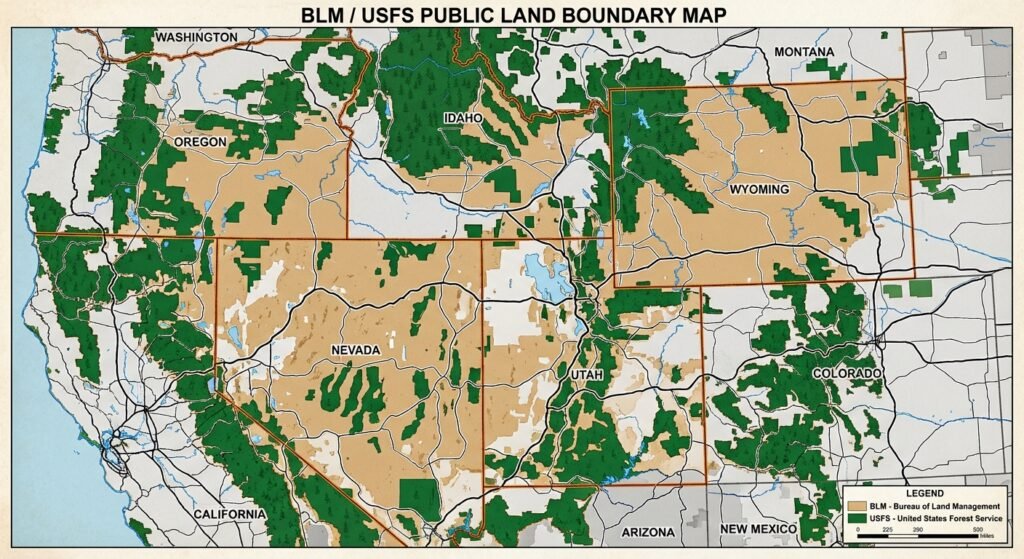
Dispersed camping is camping outside developed sites, typically on BLM or National Forest land. BLM policy allows dispersed camping on most public land unless an area is posted “Closed to Camping.” USFS lands follow similar rules, with individual ranger districts setting local restrictions. Confirming land ownership is a necessary step — it is not sufficient on its own. Closures, seasonal restrictions, and local permit requirements can override the general permission even on verified public land.
The problem is that BLM and USFS land is interspersed with private, state, tribal, and other land categories. Without a public land boundary layer active on your map, every promising pull-off is a guessing game. Map layer tools eliminate most of that guesswork.
Common misconception
Many guides recommend Google Maps as a starting point for dispersed camping research. Google Maps shows satellite imagery and some road names, but it does not display BLM or USFS boundary layers. It has no data on land ownership. Using Google Maps to verify that a site is on public land is not reliable — the land visible in satellite view may be private.
Verified correction: The authoritative public land boundary sources are the BLM Maps portal and the USGS National Map. Gaia GPS, Caltopo, OsmAnd, and Avenza Maps can incorporate these official datasets. Google Maps cannot.
The 14-day dispersed camping limit: what the BLM rules actually say
BLM dispersed camping is generally limited to 14 days within any 28-day period. (BLM.gov, Camping on Public Lands) After reaching the stay limit, you must relocate. The required move-out distance varies by field office — verify the specific distance with the local BLM office before your trip, as it is not uniform nationally.
Three constraints apply that many guides omit:
- The 14-day limit accumulates across multiple short visits, not only continuous stays.
- Individual BLM field offices and USFS ranger districts can — and do — set shorter limits, seasonal closures, or different move-out distances. The national default does not override local rules.
- Some field offices apply stricter annual limits rather than the rolling 28-day window. Check directly with the field office governing your target area before planning any extended stay.
The 14-day rule does not apply to designated Long-Term Visitor Areas (LTVAs), which operate under separate fee and permit structures.
Practical implication for map tool use: You need to know not just that an area is BLM land but which field office governs it. Gaia GPS and Caltopo display BLM boundaries but do not show field office jurisdictions inline. For jurisdiction-specific rules, cross-reference with BLM’s recreation pages or call the field office directly before arrival.
The core workflow: This guide covers four free tools — Gaia GPS, Caltopo, OsmAnd, and Avenza Maps — each capable of incorporating official BLM and USFS geographic data. The right choice depends on three criteria: whether you need offline capability, how comfortable you are building custom layer stacks, and whether your primary goal is land boundary verification or road-level navigation to a site. App features and free-tier access change over time; confirm current capabilities at each provider’s website.
Gaia GPS (free tier): integrated layer stack for pre-trip planning
Gaia GPS’s free tier includes BLM boundary overlays, USFS road layers, and public land classification. These are the core layers for verifying land ownership and road access on a candidate dispersed camping area. Confirm current free-tier feature availability at gaiagps.com, as tier content changes.
The layer stack that works for dispersed site hunting:
- Gaia Topo: Topographic basemap. Contour lines help identify flat areas suitable for an RV or large tent footprint.
- Public Land: Color-coded ownership (BLM, USFS, NPS, private, tribal). This layer answers “can I camp here?” — subject to local rules.
- USFS Roads and Trails (MVUM): Motor Vehicle Use Maps showing which roads are open to which vehicle types. Open roads generally permit dispersed camping along their corridors, subject to district-specific restrictions.
- USFS 2016: Older but still useful for showing developed recreation sites and designated areas within national forests.
![Gaia GPS public land layer screenshot]](https://boondockorbust.com/wp-content/uploads/2024/10/gaia-gps.jpg)
What the free tier does not include: Offline map downloads require a Gaia GPS premium subscription. In areas without cell service — which covers most worth-finding dispersed sites — the free tier shows a blank map. Use the free tier for desktop planning; pair it with OsmAnd or Avenza Maps for in-field offline navigation.
Caltopo (free tier): strongest desktop tool for layering multiple data sources
Caltopo’s free tier combines USGS topographic maps, satellite imagery, and public land boundaries in a single view. It is the preferred desktop planning choice when you need to overlay two or more data sources simultaneously to assess land ownership and physical site conditions together. Confirm current free-tier layer availability at caltopo.com.
Key layer combinations for dispersed camping:
- MapBuilder Topo + Public Lands: Confirms land ownership against a detailed topographic base. The most common starting stack.
- Satellite + Public Lands: Lets you visually assess terrain, tree cover, access road conditions, and potential camping spots on confirmed public land.
- MVUM + Topo: Shows Forest Service road accessibility layered over contour data. Identifies which roads are open and whether the terrain alongside them is campable.
- Cell Coverage: Caltopo’s cell coverage layer allows you to select by individual carrier (AT&T, T-Mobile, Verizon). This is a useful planning advantage for remote work and emergency communication planning.
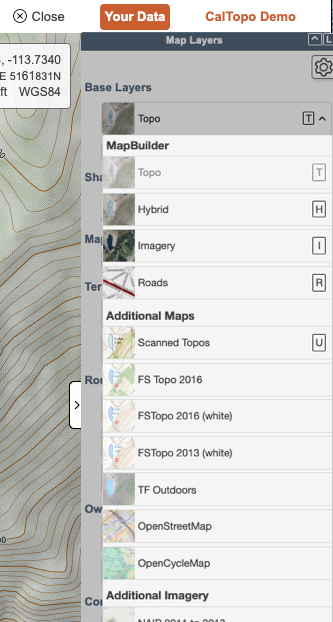
What the free tier does not include: Offline capability is limited for free accounts. Caltopo is primarily a web-based planning tool. For in-field navigation without cell service, pair it with OsmAnd or Avenza Maps. It does not provide turn-by-turn routing.
OsmAnd: fully offline, fully free, higher learning curve
OsmAnd is an open-source mapping application that stores entire map regions on your device — no cell service, no subscription, no data connection required after setup. It is built on OpenStreetMap data and supports custom layer imports, including public land boundary files.
The setup process takes more time than Gaia GPS or Caltopo, but the result is a mapping tool that works identically with or without cell coverage:
- Download regional map files for any U.S. state directly within the app — no internet required after download.
- Add custom USFS and BLM boundary layers via the plugin system. The app supports custom map file formats and raster overlay imports; see OsmAnd’s raster map documentation for current import instructions.
- GPX track recording lets you mark and save candidate sites for future reference.
- Offline routing works for navigation to a site without active cell service.
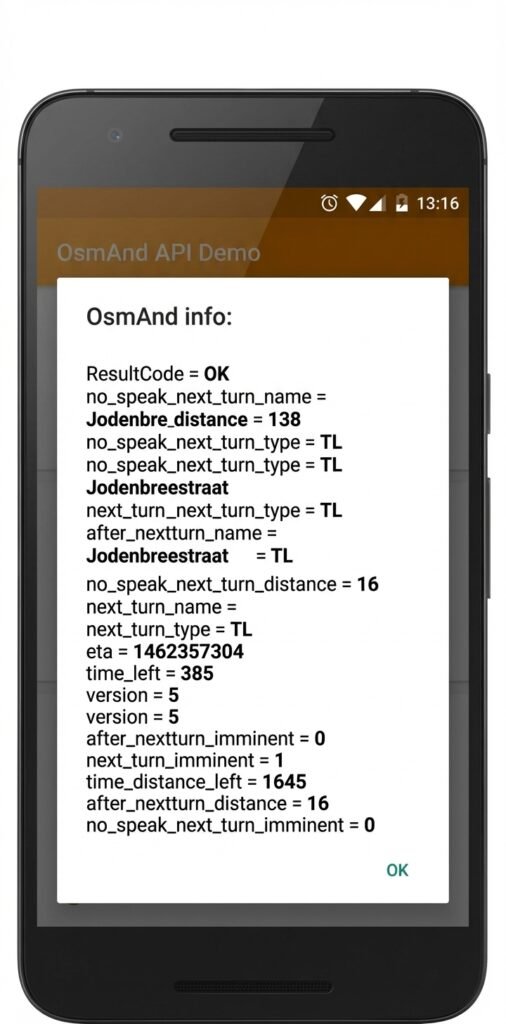
What OsmAnd does not include natively: USFS or BLM layer integration requires manual import — the app does not display public land ownership in the default configuration. OpenStreetMap data quality on remote forest roads varies; some roads are missing or mislabeled. Do not rely on OsmAnd road data alone for technical off-road routes without cross-referencing an official MVUM.
Available at osmand.net for Android and iOS.
Avenza Maps: the official MVUM viewer for in-field use
Avenza Maps is the most direct path to official USFS Motor Vehicle Use Maps (MVUMs) on a mobile device. MVUMs are the authoritative USFS documents showing which Forest Service roads are open to motorized vehicles and to which vehicle types. Road-access permission and dispersed camping permission are related but separate: an open road on an MVUM generally allows dispersed camping along its corridor, but district-specific restrictions may still apply. Verify current rules with the ranger district before travel.
The USFS publishes MVUMs as geospatial PDF files. Avenza imports these files and uses your device’s GPS to show your real-time location on the official map — no internet required after download.
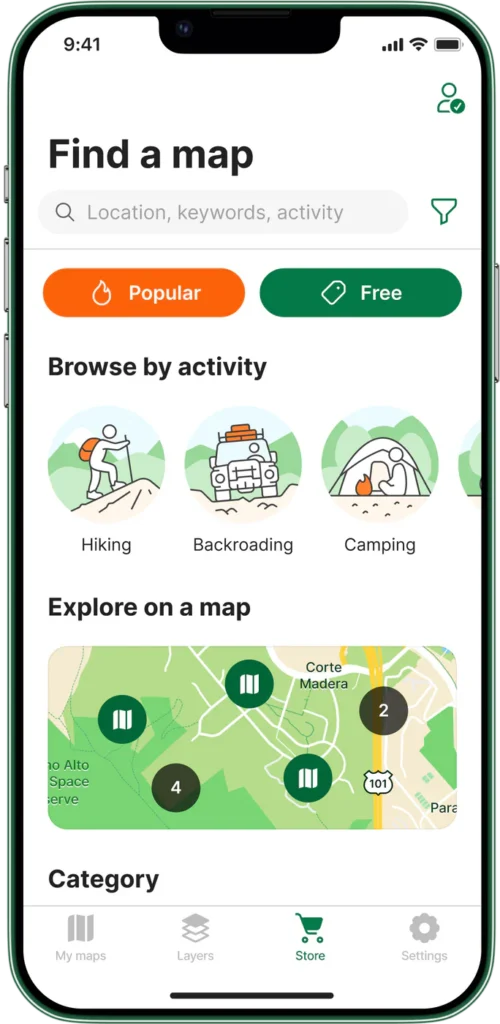
How to use it:
- Identify the National Forest or BLM district you plan to visit.
- Download the MVUM for that unit from fs.usda.gov/visit/maps (USFS) or the appropriate BLM field office page. Most MVUMs are free.
- Import the PDF into Avenza Maps. The app geo-references it automatically.
- Enable GPS tracking in the app. Your position appears on the official map in real time.
What Avenza does not include: It is a map viewer, not a navigation app. It will not route you to a waypoint or provide turn-by-turn directions. It also does not show public land ownership beyond what is printed on the source MVUM. Use it alongside Gaia GPS or Caltopo during pre-trip planning for ownership verification.
Available at avenzamaps.com for Android and iOS.
Side-by-side comparison: which tool handles which job
Feature availability as of March 2026. Free-tier access changes — verify at each provider’s website before your trip.
The two-tool workflow: plan on Caltopo, navigate with OsmAnd or Avenza
No single free tool covers the full workflow from desktop planning to in-field navigation. These two combinations work reliably for most RV boondockers:
Option 1 — Caltopo + Avenza Maps: Use Caltopo at home to identify candidate areas using stacked public land, MVUM, and satellite layers. Then download the MVUM for your target National Forest or BLM district and load it into Avenza Maps before you leave cell range. Once on-site, Avenza shows your GPS position on the official MVUM in real time.
Option 2 — Gaia GPS + OsmAnd: Use Gaia GPS (web or app) to plan using its integrated layer system. Download the OsmAnd map for the target region before the trip. OsmAnd handles offline turn-by-turn navigation to a waypoint you’ve marked in Gaia GPS.
What neither combination handles: Both options give you land ownership data and road access information. Neither gives you confirmed site-level conditions — whether the spot is occupied, what road quality looks like after recent weather, or whether a specific pullout can fit your rig. For that, layer in user-submitted databases like FreeCampsites.net or Campendium after you’ve verified the land status independently.
For RV-specific routing to a site you’ve identified, a separate RV GPS tool is required. See our field-tested comparison: best free RV GPS apps for boondockers.
Official government map resources: free and authoritative
The third-party tools above can incorporate data from these primary sources. Using them directly costs nothing and removes the intermediary:
- BLM Maps portal: Downloadable surface management maps showing BLM, USFS, NPS, and private land for each state. Available as PDF and GIS shapefiles. The authoritative source for land ownership verification.
- USFS Maps & Apps: Official source for Motor Vehicle Use Maps by ranger district. Free downloads for every National Forest in the contiguous U.S.
- USGS National Map: High-resolution topographic data and land ownership boundaries. Downloadable for offline use.
- BLM National Data Viewer (GeoBOB): Interactive web-based viewer for BLM land status, roads, and designated areas. Not mobile-optimized, but reliable for desktop pre-trip research.
Constraint: Government portal maps are authoritative but not designed for field navigation. Download PDFs for offline reference, but use Avenza Maps or OsmAnd for in-field GPS tracking against those files.
For a broader look at legal free camping options — including membership programs, dispersed sites, and app-based spot-finding — see our guide to free campsite apps. For a rundown of where overnight parking remains viable in 2026, see our free RV parking guide.
What map layers cannot tell you — and what fills the gap
Map layer tools answer the ownership question. They do not answer the conditions question. Five things that require a different source — and a phone call or site check before you commit:
- Current road closures and fire restrictions: MVUMs show roads as they were when the map was published. Seasonal closures, fire restrictions, and washouts are not reflected. Check with the relevant BLM field office or ranger district website before the trip, or call ahead. Fire restrictions change rapidly in dry seasons.
- Whether a specific site can physically fit your rig: A road marked open on an MVUM may be passable by a pickup but not a Class A. User-submitted databases like Campendium often include rig-size notes from people who’ve been there.
- Current occupancy: No free map tool shows real-time occupancy at dispersed sites. You will occasionally drive to a confirmed-legal spot and find it taken. Build a short list of two or three candidate sites per trip.
- Water source status: Springs and streams shown on topo maps may be seasonal or dry. Verify independently before counting on on-site water.
- Local permit requirements: Certain areas require fire permits or group permits even for dispersed camping. California BLM land requires a free California Campfire Permit for any open fire or gas stove use. Requirements vary by state and district — verify with the local office before your trip.
Frequently asked questions
Is all BLM land open to dispersed camping?
Most BLM land is open to dispersed camping unless an area is posted “Closed to Camping” or subject to specific land use restrictions. (BLM.gov) Some areas are closed for conservation, active restoration, or resource protection. Always check for posted signs and verify current closures with the local field office before committing to a site.
What is an MVUM and why does it matter for boondocking?
A Motor Vehicle Use Map (MVUM) is an official USFS document showing which roads within a National Forest are open to motorized vehicles and for which vehicle types. Dispersed camping is generally permitted along open Forest Service roads, though district-specific restrictions may still apply — road access and camping permission are separate determinations. MVUMs are published per ranger district and available free at fs.usda.gov/visit/maps.
Can I use Google Maps to find dispersed camping?
Google Maps does not display BLM or USFS land ownership boundaries. It shows satellite imagery and some road names, but it cannot confirm whether a specific location is on public land open to camping. It is not a reliable tool for verifying dispersed camping legality. Use Gaia GPS, Caltopo, or the BLM Maps portal for ownership verification.
Do any of these tools work without cell service?
OsmAnd (after downloading regional map files) and Avenza Maps (after downloading MVUM files) both function fully without cell service. Gaia GPS free tier and Caltopo free tier require an internet connection for map tile loading. Pre-download everything before leaving cell range.
What is the BLM 14-day limit and how is it calculated?
BLM dispersed camping is generally limited to 14 days within any 28-day period. The limit applies cumulatively — multiple short visits count toward it. After reaching 14 days, you must relocate; the required move-out distance varies by field office and is not uniform nationally. Individual field offices may impose shorter limits. Verify the specific rules with the local BLM office before your trip. (BLM.gov)
35+ years of field-tested boondocking knowledge, delivered free.
Get our weekly dispatch — real trips, real rigs, real conditions. No RV park ads, no fluff.


