
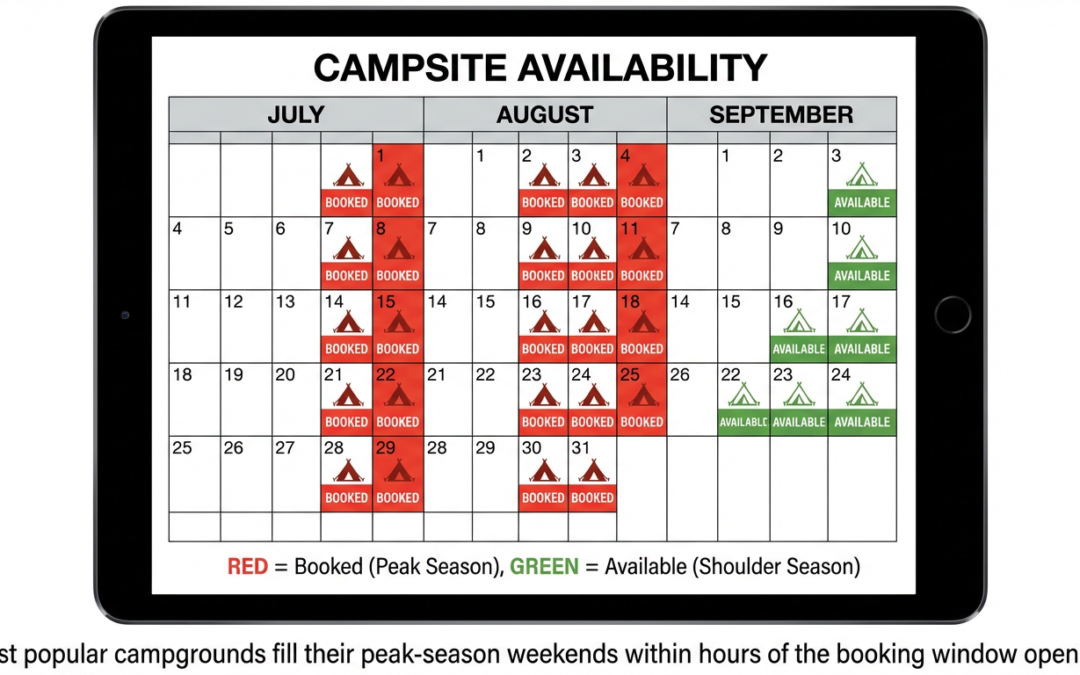
You log in at exactly 10:00am on the day the reservation window opens. The site you want is gone before you can finish clicking. You check again that evening, and for three days after. Nothing.
That experience is not unusual. Industry surveys show 56% of campers reported trouble finding available sites in 2024 because campgrounds were full. But “sold out” does not mean game over. It means your first plan is unavailable.
Most campgrounds release sites back into availability through cancellations, no-show windows, and walk-up inventory. Private campgrounds and BLM public land nearby often have open sites when the federal parks are packed. The difference between campers who get stuck and campers who get out is knowing the system.
This guide covers that system in three parts: how to position yourself to catch sites at booking windows and cancellation drops; how to use the tools that do the monitoring for you; and where to pivot when the primary campground is genuinely unavailable.
Why Campgrounds Sell Out in Minutes
Popular federal campgrounds release reservations on a rolling 6-month window, and high-demand sites can fill within minutes of the daily 10am ET release.
Recreation.gov manages reservations for more than 3,600 facilities and 103,000 individual sites across 14 federal agencies. The platform opens new dates daily. For most campgrounds, that happens at 7am Pacific / 10am Eastern — but not for every campground, and not always at the same time for every facility.
The supply is fixed. The campground inventory does not grow to meet demand. And over the past five years, roughly 11 million more households started camping compared to 2019. That arithmetic explains the sold-out screen.
This is not a competition you win with luck. It is one you win by knowing the exact release time for your target campground, being positioned before it opens, and having your backup sites already identified.

Step 1: Know the Exact Booking Window Before You Do Anything
Most Recreation.gov campgrounds go on sale daily at 7am PT / 10am ET on a rolling 6-month window — but always check the Seasons and Fees tab on the specific campground page before you plan your booking day.
That tab is where facilities post their exact release times, shorter booking windows for walk-up periods, and any seasonal restrictions. Recreation.gov’s official booking guidance recommends synchronizing your clock to Recreation.gov’s own clock (Coordinated Universal Time) rather than trusting your device clock.
Six months out from July 4th means you need to be logged in and ready on January 4th at 7am PT. If you are off by even a few minutes at a high-demand campground, you are competing against the people who were ready.
Before opening day:
- Create a Recreation.gov account and log in well in advance — not the morning of
- Pre-load your target campground page and have your preferred dates selected
- Have your credit card information saved in your profile
- Identify at least three alternate sites in case your first choice is gone
- Know the exact release time for your specific campground from the Seasons and Fees tab
The competition at the most popular campgrounds is real. Recreation.gov’s FAQ confirms the platform actively manages traffic spikes at high-demand release times. Being prepared does not guarantee success, but showing up unprepared almost always means failure.
What this step does NOT cover: State parks using ReserveCalifornia, Reserve America, or GoingToCamp operate on different schedules, booking windows, and rules. If your target is a state park, verify the booking window directly with that platform.
Step 2: Use Availability Alerts and Cancellation Windows
Recreation.gov’s free Availability Alert feature sends an email notification when a campsite matching your saved preferences becomes available due to a cancellation — but the same alert goes to every other camper who set it for those dates.
This is not a guaranteed reservation. It is a signal. You still have to act immediately.

How to set up Recreation.gov alerts:
- Navigate to the campground page
- Click the Availability Alert button
- Enter your preferred arrival date and length of stay
- Add any site filters (hookups, accessibility, site type)
- Save — you will receive an email when a matching site opens
When cancellations tend to cluster:
The Recreation.gov cancellation policy creates predictable release patterns. A camper who cancels the day before or day of arrival pays a $10 service fee and forfeits the first night’s use fee. That penalty encourages early cancellations. In practice, cancellations cluster in the 48–72 hours before arrival, when campers have decided the trip is not happening but still want to avoid the full forfeiture.
A no-show is treated differently. Recreation.gov holds a campsite until checkout time on the day after the scheduled arrival date. The no-show is assessed a $20 fee and forfeits the first night’s recreation fee. At staffed campgrounds, rangers may release those sites for walk-up campers. Arriving in the morning and asking about no-show sites is a legitimate tactic at staffed facilities.
Third-party alert tools:
Campnab and Campflare offer SMS-based alerts for Recreation.gov cancellations, which is faster than email for sites that move quickly. These are paid services (typically a few dollars per scan). For a full comparison of campsite-finding apps, see the best apps for finding free campsites.
Correction: The “15-minute cart hold” myth
A widely circulated claim suggests that campsites held in shopping carts return to inventory at the 15-minute mark past the hour, creating a predictable availability window. Recreation.gov’s official FAQ and reservation policy documentation do not describe this as a platform-wide rule. Cart timeout behavior may exist as a technical function, but there is no documented release schedule tied to it. Do not plan your booking strategy around this claim. Use the official Availability Alert feature instead.
Step 3: Split Your Stay Across Multiple Sites
If no single site covers your full trip, book consecutive nights on different sites — Recreation.gov explicitly supports split stays and it is one of the most underused booking tactics.
Recreation.gov’s official tips state directly: “You may have to string together multiple campsites if the site you want is not available for your entire stay. Yes, you’ll have to break camp and move your gear, but you’ll be there.”
In practice, this works as follows: open the campground’s availability grid view (not the standard calendar view), scan for consecutive nights across different numbered sites, and book each segment separately. You may need to move once during the trip. For most RV setups — especially a Class B van — that is a 30-minute process, not a hardship.
Split stay works best when:
- Your target campground has partial availability scattered across different sites
- You are staying 3 or more nights and can tolerate one move
- The campground’s sites are similar enough that any open site meets your needs
Split stay does not solve the problem when:
- You have a large rig that requires a specific hookup or pull-through and only one type qualifies
- Your trip is a single night (no room to split)
- The campground has zero availability on any site for any night of your stay
Step 4: Shift Your Dates, Not Just Your Campground
Weekday and shoulder-season arrivals face significantly less competition because most campers target Friday–Sunday peak windows.
This is the simplest adjustment with the highest impact. Recreation.gov’s own booking guidance explicitly recommends avoiding the crowds by targeting weekdays and shoulder season. Availability alerts filtered for flexible dates (the option to include two days before and after your preferred arrival) can surface openings that rigid date targeting misses entirely.
What shoulder season looks like by region:
- Mountain West (Rockies, Tetons, Glacier): late August and September see sharply lower demand compared to peak July
- Southwest desert parks (Zion, Arches, Grand Canyon): spring and fall shoulder is October–November; some are busiest in October
- Pacific Coast: fall is softer at many coastal campgrounds; June can be foggy and cold, reducing demand vs. August
What this does NOT fix: Yosemite Valley in July, Grand Teton on a July 4th weekend, and similar peak-event windows are sold out on weekdays as well as weekends. Date flexibility helps but is not a universal solution for the highest-demand parks during peak weeks. For those situations, Steps 5 and 6 below are the actual answer.
Step 5: Expand the Map — Private Campgrounds and Nearby Options
Private campgrounds and glamping resorts accounted for 31% of all nights camped in 2024 — the highest share on record — because they often have availability when public parks are fully booked.
The 2025 KOA Camping & Outdoor Hospitality Report shows private campgrounds are absorbing a growing share of camping demand precisely because they are not on the same reservation calendar as federal facilities. When Yosemite Valley is sold out for the next six months, dozens of private campgrounds in the Stanislaus National Forest gateway communities still have sites.
Where to look:
- Hipcamp lists private landowner campgrounds, farms, and vineyards not on Recreation.gov
- Harvest Hosts and RV Overnights offer one-night stays at wineries, breweries, and businesses for members — worth checking against your route (see Good Sam vs. Harvest Hosts vs. RV Overnights comparison)
- Recreation.gov’s “recommended sites nearby” appears when your primary campground search returns no availability — use it
- KOA campgrounds and private RV parks in gateway communities to national parks often have availability during peak public-land blackouts
What private campgrounds do NOT cover: Private sites are not eligible for America the Beautiful pass discounts. Nightly rates at private campgrounds near national parks typically run $40–$80+ per night, versus $25–$35 at federal campgrounds. Amenity levels vary widely. RV length and rig-type restrictions differ by property.
The sold-out campground problem is really three problems stacked together: a booking window problem, a monitoring problem, and a backup-options problem. Mastering the booking window puts you in position to get sites at first release. Alert tools solve the monitoring problem. And knowing where to pivot — to nearby private parks, BLM land, or national forest dispersed sites — means a sold-out calendar is rarely the end of the trip.
Step 6: Use BLM and National Forest Dispersed Camping as Your Backup
Most BLM land allows free dispersed camping for up to 14 days within any 28-day period — a legitimate same-trip backup when nearby campgrounds are fully booked.
Most campground-focused travel articles stop at “try a nearby campground.” Experienced RVers know that dispersed camping on public land is often 20 minutes from the national park entrance, completely free, and available when everything with a reservation system is sold out.
Per BLM’s dispersed camping guidance:
- Most BLM land allows dispersed camping unless posted “Closed to Camping”
- Stay limit: 14 days within any 28-day period; then must move at least 25–30 miles
- Free on most BLM land unless a fee is posted
- Vehicles must stay on designated roads and trails
- Dispersed camping is for short-term recreation, not long-term living
National forest dispersed camping works similarly but rules vary by ranger district. Always verify with the specific district office before planning a dispersed stay, especially for high-use areas near popular parks.
For a full breakdown of what changed in BLM rules and where dispersed camping is restricted, see the updated BLM camping rules guide.
Dispersed camping is NOT appropriate when:
- Your rig requires electric, water, or sewer hookups
- You are unfamiliar with self-contained camping and waste management
- Current fire restrictions prohibit campfires in the area (check before you go)
- The specific area near your target park has active dispersed camping closures
For help finding actual dispersed sites near your route, see how to find free dispersed camping sites.
The Mistakes That Kill Your Odds
Most booking failures come from five mistakes: wrong timing, inflexible dates, single-campground focus, ignoring alerts, and not knowing the backup options.
1. Not checking the exact release time for your campground.
The 7am PT / 10am ET default is not universal. Some campgrounds have different release times listed in their Seasons and Fees tab. Showing up 10 minutes after your campground’s actual release time means you are competing against everyone who was there on time.
2. Searching only Friday–Sunday at peak season.
If you will only accept a Friday arrival in July, you are competing against the maximum number of other campers. That is a choice, not a constraint. Tuesday and Wednesday arrivals access the same campground with far less competition.
3. Targeting only one campground with no backup plan.
Popular campgrounds can be sold out for their entire open season by the time the rolling window reaches peak summer dates. A plan with no alternate campgrounds, no nearby private options, and no dispersed-camping knowledge is a plan that fails.
4. Waiting to set availability alerts.
Alerts set the week before your trip compete against alerts set by hundreds of campers who have been monitoring the same dates for months. Set alerts as soon as you know your target dates.
5. Treating the first “Sold Out” as final.
Availability changes every day. Cancellations happen continuously. The sold-out screen on the day you check is not the same as the sold-out screen on arrival day. Keep monitoring.
Quick Backup Decision Tree: What to Do When Everything Is Sold Out
If your target campground is sold out, follow this order: set alerts, try split stays, shift to weekdays, check nearby private campgrounds, and evaluate BLM or national forest dispersed sites.
- Set a Recreation.gov Availability Alert for your specific dates — it is free and takes two minutes
- Check the availability grid for split-stay openings across multiple sites at the same campground
- Search the same campground for Tuesday–Thursday openings if your dates are flexible
- Use Recreation.gov’s “nearby facilities” suggestion when primary search returns no availability
- Check Hipcamp, Harvest Hosts, and private KOA parks near the area for private alternatives
- Evaluate BLM or national forest dispersed camping if your rig is self-contained and the area has open land
Steps 1 through 4 are free and take under 15 minutes. Step 5 requires a quick search. Step 6 requires planning and self-sufficiency — but it is the one that experienced boondockers default to, because public land near popular national parks is almost never actually full.
Frequently Asked Questions
What time does Recreation.gov release campsites?
Most campgrounds release new reservation dates daily at 7am PT / 10am ET on a rolling 6-month window. The exact release time for your specific campground is listed in the Seasons and Fees tab on the campground’s page. Some facilities use shorter booking windows or different release times.
How do campsite availability alerts work?
Recreation.gov’s Availability Alert feature sends a free email notification when a campsite matching your saved date, length, and filter criteria opens up due to a cancellation. Third-party tools like Campnab and Campflare offer SMS-based alerts for faster notification. Alerts do not auto-book — you must complete the reservation manually.
Can I book two different campsites in a row to extend my stay?
Yes. Recreation.gov officially supports this. Use the availability grid view on the campground page to find consecutive nights across different sites. You will need to move your gear once, but you maintain the same campground location.
Is dispersed camping legal near national parks?
Dispersed camping is allowed on BLM and national forest land, subject to local rules and closures. It is not permitted inside national park boundaries. Check with the local BLM field office or ranger district for current restrictions, especially for high-use areas near popular parks.
What happens to no-show campsite reservations?
Recreation.gov holds a reserved campsite until checkout time on the day after the scheduled arrival date. No-shows are assessed a $20 fee and forfeit the first night’s fee. At staffed campgrounds, rangers may release those sites for walk-up campers — arriving in the morning and asking is a legitimate approach.
Do America the Beautiful passes work at private campgrounds?
No. The America the Beautiful Interagency Pass applies only to federal recreation sites participating in the program. Private campgrounds, Hipcamp listings, Harvest Hosts, and commercial RV parks are not eligible for pass discounts.
Chuck Price is the founder of Boondock or Bust and has been RV camping across 47 states for 35+ years. He built KampTrail, a free camping app using the Recreation.gov public data API.


