
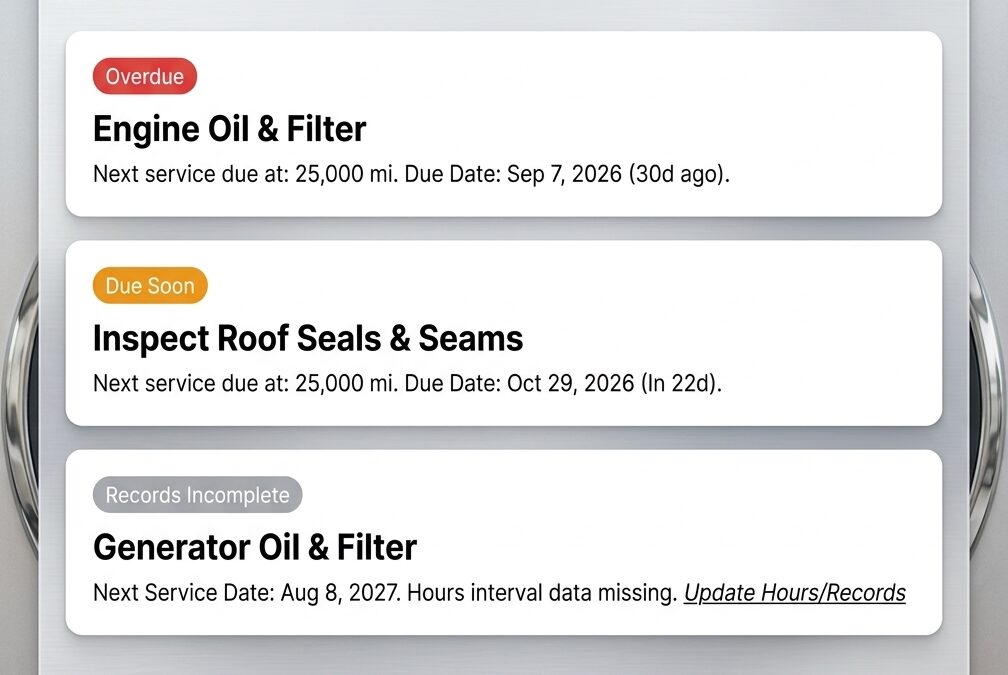
Ditch the Spreadsheet: Introducing Our Free RV Maintenance Tracker
Engine miles, generator hours, and calendar months each run their own service clock. The Boondock or Bust RV Maintenance Tracker follows all three in one place. It is a free web app, as of October 2026, and works in your phone’s browser.
We tried the usual fixes first. Paper logs get lost, stained, or soaked in a leak. Spreadsheets are hard to read and update on a phone while you stand at the engine bay with greasy hands. The RV maintenance apps we tried came with ads, monthly fees, or limits on getting your data back out. So we built our own.
What the Tracker Does
The tracker sorts every maintenance task into Overdue, Due Soon, OK, or Unknown. Due Soon means a task is within 30 days, 500 miles, or 25 generator hours of coming due. Unknown shows until a task has a service history, so expect to see it on day one. This lets you see the next job before it turns into a repair. Example: an oil change 400 miles out shows as Due Soon, and one 900 miles out shows as OK.
- The dashboard groups tasks into Overdue, Due Soon, OK, and Unknown.
- Each task can run on miles, generator hours, months, or a mix.
- Whichever limit you reach first marks the task due.
- Every odometer or generator hour update is saved to a usage history.
- You can export all records to a CSV file at any time.
The CSV gives you a dated service history to show a dealer or a buyer. Check your warranty terms to see which records the manufacturer asks for.
How Multi-Threshold Due Dates Work
A multi-threshold task has two or more limits, and the first one reached makes it due. Maintenance schedules use this pattern because miles and time wear parts differently. The example below applies to the oil rule shown and to the two starting defaults, and your own rig may differ. Example: engine oil set to 5,000 miles or 6 months comes due at month 6 if you drove only 2,000 miles.
| Task | Tracked by | Interval | Use case |
|---|---|---|---|
| Engine oil | Miles and months | 5,000 miles or 6 months, whichever comes first | Full-timers and weekend travelers who drive very different distances |
| Roof seals | Months | Every 3 months | Any rig, including one parked for long stretches |
| Winterizing | Months | Every 12 months | Owners in freezing climates |
You can change any interval to match your manual.
Who It Fits and Where It Falls Short
The tracker fits one owner logging one or more RVs from a phone. It is built for people who want a due-soon list without setup work. The limits below describe the product as of October 2026. Example: you log an oil change in a campground with a data connection, but you cannot log it in a dead zone until offline mode ships.
It is a good fit if:
- You own a motorhome, van, fifth wheel, or travel trailer.
- You track engine miles, generator hours, or both.
- You want a free tool with no AI features and no social feed.
It is not ideal if:
- You need to log service with no data connection today.
- You want email reminders today. They are planned.
- Two drivers need to share one dashboard today. Household sharing is planned.
Login, Privacy, and Your Data
You sign in with a magic link, so there is no password to create or reset. The tracker emails a one-time link, and you tap the link and confirm to start your session. This keeps the sign-in simple on a phone. The description applies to the current version and to accounts created with an email address. Example: type your email, open the message, tap the link, and your dashboard loads.
- We do not sell your data.
- We run no ads and no third-party tracking cookies. The sign-in page loads Cloudflare Web Analytics, which counts page loads without cookies, and Cloudflare Turnstile, which checks sign-ins for bots.
- We store what you enter: your email, your rigs, and your service records. We also keep sign-in timestamps and IP addresses for security. Details are in our privacy policy.
- A Delete My Account button removes your account.
- You can export your records to CSV before you leave.
Set Up Your First Rig in Five Steps
Setup takes five steps, and the dashboard is ready after the last one. Each step feeds the next, so the order matters, and the last step calibrates what the dashboard shows. The steps apply to the web version at the address below and assume you are adding your first rig. Example: have your odometer and generator hour meter readings ready before step 3, if your rig has them.
- Open tracker.boondockorbust.com. Bookmark it or use Add to Home Screen on your phone.
- Enter your email and click the magic link sent to your inbox.
- Add your rig. Choose a type (motorhome, van, fifth wheel, or travel trailer), give it a nickname, and enter your odometer and generator hours, if applicable.
- Review the schedule. The tracker preloads defaults such as roof seal checks every 3 months and winterizing every 12 months. Edit each interval to match your owner’s manual.
- Log your last service. Enter the date and mileage of your last oil change or battery check to calibrate the dashboard.
What Is Planned Next
Three features are planned and not yet released. They are offline mode, optional email reminders, and household sharing. We list them so you know what the tracker cannot do yet and can decide whether to wait. The list covers the roadmap as of October 2026 and may change. Example: with offline mode, you would log service with no signal and sync when you reconnect.
- Offline mode: log maintenance with no signal and sync later.
- Email reminders: optional alerts before big services come due.
- Household sharing: two drivers see the same dashboard.
Want a feature? Tell us in the comments. Reader requests decide what we build next.
Frequently Asked Questions
How much does the RV Maintenance Tracker cost?
The tracker is free as of October 2026. There is no paid tier, and there are no ads. You sign in with an email address and a magic link. Pricing can change, so confirm the current terms at tracker.boondockorbust.com before you set up a rig.
Do I need a password to use the tracker?
No. You enter your email address and the tracker sends a one-time magic link to your inbox. You tap the link and confirm to start your session. You never create, remember, or reset a password. The tracker does not ask for a password at any step.
Does the RV maintenance tracker work offline?
Not yet. Today you need a data connection to log service. Offline mode is on the roadmap. It would let you log maintenance with no signal and sync when you are back in range. The roadmap can change, so check the tracker for current status.
Can I export my RV maintenance records?
Yes. You can export your full maintenance history to a CSV file at any time. The file works as a dated service record. Check your warranty terms to learn which records your manufacturer requires, since a CSV export does not guarantee a claim will be accepted.
Can I change the default service intervals?
Yes. The tracker preloads starting defaults, such as roof seal checks every 3 months and winterizing every 12 months. You can edit each interval to match your owner’s manual. Always follow the manufacturer’s schedule for your make, model, and year over any default.
Set Up Your Rig Today
Open tracker.boondockorbust.com, add your rig, and log your last oil change. Then compare each default interval to your owner’s manual and edit any that differ. Tell us in the comments which feature you want most.
Maintenance intervals vary by make, model, and year. The tracker’s defaults are starting points. Follow your owner’s manual and consult a qualified technician for service decisions. Features and pricing are accurate as of October 7, 2026 and are subject to change.


